Windows Based Solution
zWAN vEC
Windows Based Solution
zWAN vEC brings SD-WAN edge control to remote and work-from-anywhere users.
The zWAN Virtual Edge Controller is software installed on a Windows based PC for remote, hybrid, and work-from-anywhere users.
vEC connects to SD-WAN Director in the cloud, helping organizations provide secure access, network resiliency, optimized application performance, and visibility without shipping a separate hardware device to every user.
Choose the zWAN deployment path that fits the environment.
Secure remote access without a separate edge appliance
Many organizations relied on traditional VPNs for home and remote users, but those tools were not built for visibility, network resiliency, and optimized application traffic across every remote location. zWAN vEC gives the user a software-defined edge path on the Windows device they already use.
Benefits
Why teams evaluate zWAN vEC
No Additional Hardware
Deploy the virtual edge controller as Windows software instead of shipping a separate hardware appliance.
Backup Connectivity
Improve productivity with automated backup internet connectivity for remote and mobile users.
Work-From-Anywhere Fit
Support remote, hybrid, and mobile workforce models that need more than legacy VPN access.
Cloud Managed SD-WAN
Connect the endpoint to SD-WAN Director in the cloud for centralized control and visibility.
Application Performance
Optimize access to corporate apps, systems, services, data, and cloud resources.
User Activity Visibility
Add analytics around user activities and application usage to help IT understand remote access behavior.
Who it's for
Built for remote and hybrid workforce operations
Remote Workforce Teams
Give remote and hybrid users a software-defined SD-WAN edge without shipping a separate appliance.
Windows Endpoint Owners
Install vEC on Windows based PCs and connect the user to SD-WAN Director in the cloud.
IT Operations
Improve remote support visibility, access consistency, and application performance across distributed users.
Business Continuity Teams
Use backup connectivity to reduce user disruption when a primary home or remote network path fails.
Security Teams
Move beyond broad VPN dependency with a managed path for corporate resources, apps, systems, and services.
Budget-Conscious Teams
Avoid the cost and logistics of shipping a dedicated gateway router to every remote user.
Resources
Explore the details
zWAN vEC Deployment Guide
Windows install, SD-WAN Director connection, backup connectivity, and remote-user validation steps.
Download PDFzWAN vEC Overview
One-page fit check for remote, hybrid, and work-from-anywhere user connectivity.
Download PDFzWAN vEC Datasheet
Placeholder for Windows requirements, supported connectivity paths, and policy assumptions.
Download PDFRemote User Diagram
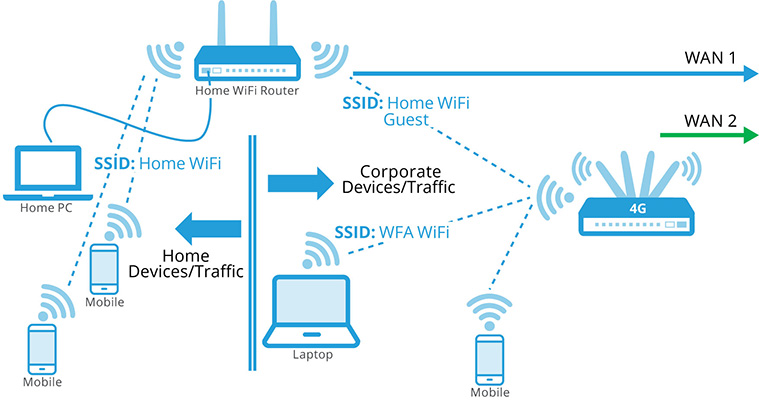
Placeholder for Windows PC, WiFi, LTE backup, SD-WAN Director, and corporate resources.
View diagram
No duct tape. No babysitting. One system, built for IT teams who need more than a checkbox.
Norcross, GA
1-877-991-1809