
-
SnapOS
-
-
- Articles coming soon
-
-
-
- Citrix HDX + USB Headset (Call-Center Baseline)
- OS/Firmware Update & Rollback
- Power Management and Session State
- Wi-Fi Roaming & Link Change Mid-Session
- Kiosk / Assigned-Access Auto-Launch
- Barcode Scanner (HID) with Line-of-Business App
- Printing to Local USB & Network Printers
- USB Device Management – Block Storage
- Multi-Monitor & 4K Performance
- Microsoft AVD/RDP + Teams Optimized Video
- VMware Horizon + Smart Card / CAC Login
-
-
-
-
zWAN
-
-
-
-
- Firewall & Layer 7 Application Filtering
- VPN Site-to-Site Tunnel Setup & Connectivity (z40 to Cloud vGR)
- Intrusion Prevention System (IPS) / Intrusion Detection System (IDS) Testing
- DNS Filtering
- DDoS Protection & Logging
- MAC Address Filtering & Geo-fencing
- Application Control & Protocol Blocking
- Authentication & Access Control (zID)
-
- WAN Link Failover & Load Balancing (ACI Mode)
- Dynamic Path Selection & Application-Aware Routing
- SaaS & Internet Breakout Validation
- QoS for Microsoft Teams (Datacenter vGR + Branch z40)
- Tunnel Failover (z40 ↔ vGR) — WAN00 (wired) primary, WAN03 (4G) & WAN04 (5G) backups
- IP Routing & Static Route Steering (z40 Branch)
- VLAN & Layer-2 Bridging
-
-
-
-
-
-
- Articles coming soon
-
- Articles coming soon
-
-
-
- Articles coming soon
-
- Articles coming soon
-
-
-
-
-
-
- Articles coming soon
-
- Articles coming soon
-
- Articles coming soon
-
- Articles coming soon
-
-
-
-
-
- Articles coming soon
-
- Articles coming soon
-
- Articles coming soon
-
- Articles coming soon
-
-
-
-
-
- Articles coming soon
-
- Articles coming soon
-
- Articles coming soon
-
- Articles coming soon
-
-
- Articles coming soon
-
- IPsec Tunnel not Establishing
- SSL-VPN Tunnel not Establishing
- Mobile Network Issues
- Management Tunnel does not Establish
- DNS not Resolving from Local Network Appliance
- DNS Resolution Issues in Tunnel Configuration
- DHCP Server not Leasing IP to LAN PC
- Debugging EC Events - Unknown Status Issue
- Trusted-MAC Geofencing Issues
- DNS Issues from DC LAN PC
- Troubleshooting LAN Connectivity to Internet via WAN, Remote Branch LAN, or Local Branch LAN
- NetBalancer gateways displaying Faulty/Inactive
- Packet Drop Issues
-
-
zGuardian
-
zAccess
-
StorTrends
Print
Using zWAN for VoIP Optimization and QoS Prioritization
Overview
This article outlines how a service provider is leveraging AmZetta zWAN to enhance VoIP traffic performance across distributed customer environments.
The deployment focuses on packet-based routing, bidirectional QoS, DSCP marking, and monitoring voice quality metrics to ensure reliable, high-quality voice communications.
Environment Details
|
Component
|
Description
|
|---|---|
|
zWAN Hardware
|
z40 Gateway Router deployed at remote site
|
|
zWAN Virtual Appliances
|
vGR hosted in cloud DC
|
|
Management
|
Centralized zWAN Director
|
|
VoIP Test Device
|
Laptop on LAN side of z40
|
|
Connectivity
|
IPsec tunnels between z40 and vGR/Director
|
Architecture Diagram (High-Level Topology)
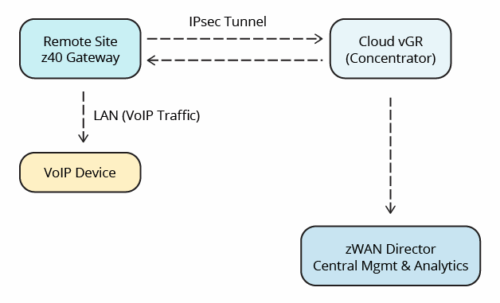
How zWAN Enhances VoIP Performance
1. Packet-Based Routing for Voice Media
The provider required packet-level processing rather than session-based flow handling to ensure:
-
Lower latency
-
Stable jitter characteristics
-
Consistent voice quality during high-load situations
zWAN handles packet-based routing by default for tunneled traffic, making it ideal for VoIP workloads.
2. Bidirectional QoS for Audio, Video & Sharing Traffic
The deployment required priority control for:
-
Audio (highest priority)
-
Video
-
Application sharing
-
Background/default traffic

Bidirectional QoS Workflow Diagram
Priority classification was performed using:
-
DSCP marks
-
IP ranges of VoIP services
-
UDP port ranges (audio, video, screen sharing)
-
Optional DPI (Deep Packet Inspection)
-
Source/destination subnets for inbound QoS
This ensured audio streams were protected in both directions, which is critical for stable VoIP.
3. DSCP Marking & Verification
The provider validated DSCP handling using:
-
Wireshark packet captures
-
tcpdump on both z40 and vGR
-
CLI scripts for QoS class and queue visibility
Example DSCP validation command:
tcpdump -vn -i IPSEC004. Monitoring Voice Quality Metrics
The provider used zWAN TWAMP to track:
-
Round-trip time
-
Latency
-
Packet loss
-
Jitter
These metrics were used to validate real-time call quality under different bandwidth and failover conditions.
5. Automatic WAN Failover
Voice sessions continued seamlessly during WAN link interruptions, thanks to:
-
Per-interface QoS
-
Automatic tunnel re-establishment
-
SIM backup interface support
This ensured uninterrupted VoIP during outages or poor network conditions.
Benefits of Using zWAN for VoIP
✔ Superior Voice Quality
Priority queues ensure voice packets are processed first, minimizing jitter and delay.
✔ End-to-End DSCP Integrity
Markings set at the client or at either zWAN endpoint are preserved across tunnels.
✔ Bidirectional QoS (Unique vs. Many SD-WAN Solutions)
Both outbound and inbound VoIP traffic receives correct classification and guaranteed bandwidth.
✔ Detailed Real-Time Visibility
Admins gain insight into:
-
Queue usage
-
DSCP values
-
Per-class bandwidth
-
Media flow behavior
✔ High Availability for Voice
Fast, stable WAN failover protects live voice calls.
Conclusion
This deployment demonstrates how a service provider successfully optimized VoIP performance using AmZetta zWAN. With packet-based routing, enhanced QoS capabilities, detailed analytics, and reliable failover, zWAN ensures high-quality voice communication across distributed environments.
Table of Contents