
-
SnapOS
-
-
- Articles coming soon
-
-
-
- Citrix HDX + USB Headset (Call-Center Baseline)
- OS/Firmware Update & Rollback
- Power Management and Session State
- Wi-Fi Roaming & Link Change Mid-Session
- Kiosk / Assigned-Access Auto-Launch
- Barcode Scanner (HID) with Line-of-Business App
- Printing to Local USB & Network Printers
- USB Device Management – Block Storage
- Multi-Monitor & 4K Performance
- Microsoft AVD/RDP + Teams Optimized Video
- VMware Horizon + Smart Card / CAC Login
-
-
-
-
zWAN
-
-
-
-
- Firewall & Layer 7 Application Filtering
- VPN Site-to-Site Tunnel Setup & Connectivity (z40 to Cloud vGR)
- Intrusion Prevention System (IPS) / Intrusion Detection System (IDS) Testing
- DNS Filtering
- DDoS Protection & Logging
- MAC Address Filtering & Geo-fencing
- Application Control & Protocol Blocking
- Authentication & Access Control (zID)
-
- WAN Link Failover & Load Balancing (ACI Mode)
- Dynamic Path Selection & Application-Aware Routing
- SaaS & Internet Breakout Validation
- QoS for Microsoft Teams (Datacenter vGR + Branch z40)
- Tunnel Failover (z40 ↔ vGR) — WAN00 (wired) primary, WAN03 (4G) & WAN04 (5G) backups
- IP Routing & Static Route Steering (z40 Branch)
- VLAN & Layer-2 Bridging
-
-
-
-
-
-
- Articles coming soon
-
-
-
-
- Articles coming soon
-
- Articles coming soon
-
-
-
-
-
-
- Articles coming soon
-
- Articles coming soon
-
- Articles coming soon
-
- Articles coming soon
-
-
-
-
-
- Articles coming soon
-
- Articles coming soon
-
- Articles coming soon
-
- Articles coming soon
-
-
-
-
-
- Articles coming soon
-
- Articles coming soon
-
- Articles coming soon
-
- Articles coming soon
-
-
- Articles coming soon
-
- IPsec Tunnel not Establishing
- SSL-VPN Tunnel not Establishing
- Mobile Network Issues
- Management Tunnel does not Establish
- DNS not Resolving from Local Network Appliance
- DNS Resolution Issues in Tunnel Configuration
- DHCP Server not Leasing IP to LAN PC
- Debugging EC Events - Unknown Status Issue
- Trusted-MAC Geofencing Issues
- DNS Issues from DC LAN PC
- Troubleshooting LAN Connectivity to Internet via WAN, Remote Branch LAN, or Local Branch LAN
- NetBalancer gateways displaying Faulty/Inactive
- Packet Drop Issues
-
-
zAccess
-
StorTrends
BGP (Border Gateway Protocol)
Overview:
BGP stands for Border Gateway Protocol and is a dynamic routing protocol used between network hosts. BGP is designed to exchange routing information between autonomous systems (AS) on the internet. All packet exchanges on the internet go with ASN as the unique identifier. It can be used for the WAN network or exterior routing (eBGP) and also the LAN network or interior routing (iBGP).
Functionality:
ZWAN uses BGP to peer the Edge Controller to the ISP. An ASN number is required and should be acquired from ARIN or the respective organisation based on geography for eBGP or mutually agreed upon by internal neighbors for iBGP.
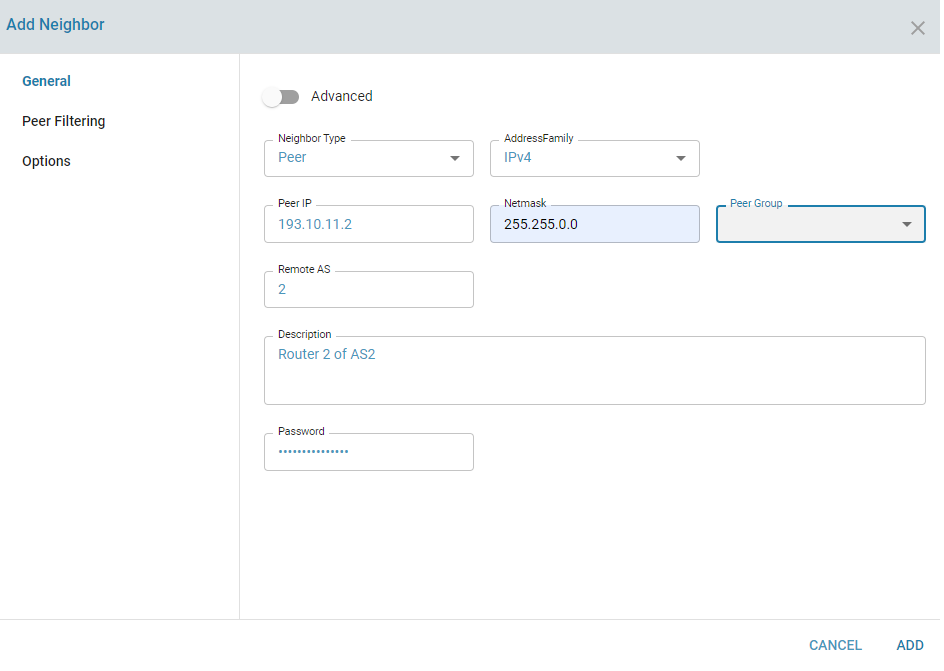
Each ISP is configured as a BGP Neighbor. Multiple neighbours can be configured.
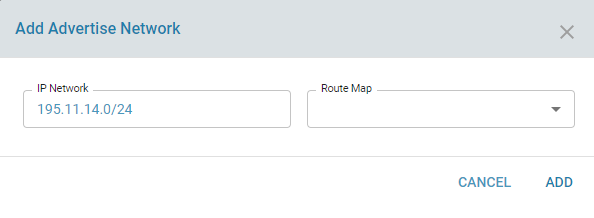
When BGP peering is successful with the ISP, the edge controller can be used to advertise our address space to the ISP. The ISPs in turn can advertise a default route, a default and partial routing table or a full Internet routing table. Receiving a default route requires minimum resources.
Detailed information on each parameter is beyond the scope of the document as is part of understanding the protocol. Information on different configuration parameters can be found http://docs.frrouting.org/en/stable-8.0/bgp.html
Configuration Parameters
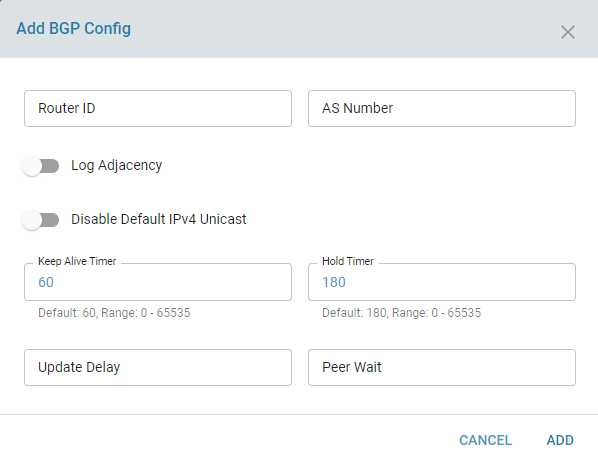
The BGP service needs to be in enabled state. An ASN number and a unique router ID is also specified and the latter is commonly set to a local private address.
Local Networks can be advertised using the Advertise Network option
Peering with an ISP can be performed by configuring a Neighbor
Use Cases:
Configure peering with multiple neighbors and advertisement and exchange of routes in both directions.
Known Limitations:
NA