
-
SnapOS
-
-
- Articles coming soon
-
-
-
- Citrix HDX + USB Headset (Call-Center Baseline)
- OS/Firmware Update & Rollback
- Power Management and Session State
- Wi-Fi Roaming & Link Change Mid-Session
- Kiosk / Assigned-Access Auto-Launch
- Barcode Scanner (HID) with Line-of-Business App
- Printing to Local USB & Network Printers
- USB Device Management – Block Storage
- Multi-Monitor & 4K Performance
- Microsoft AVD/RDP + Teams Optimized Video
- VMware Horizon + Smart Card / CAC Login
-
-
-
-
zWAN
-
-
-
-
- Firewall & Layer 7 Application Filtering
- VPN Site-to-Site Tunnel Setup & Connectivity (z40 to Cloud vGR)
- Intrusion Prevention System (IPS) / Intrusion Detection System (IDS) Testing
- DNS Filtering
- DDoS Protection & Logging
- MAC Address Filtering & Geo-fencing
- Application Control & Protocol Blocking
- Authentication & Access Control (zID)
-
- WAN Link Failover & Load Balancing (ACI Mode)
- Dynamic Path Selection & Application-Aware Routing
- SaaS & Internet Breakout Validation
- QoS for Microsoft Teams (Datacenter vGR + Branch z40)
- Tunnel Failover (z40 ↔ vGR) — WAN00 (wired) primary, WAN03 (4G) & WAN04 (5G) backups
- IP Routing & Static Route Steering (z40 Branch)
- VLAN & Layer-2 Bridging
-
-
-
-
-
-
- Articles coming soon
-
-
-
-
- Articles coming soon
-
- Articles coming soon
-
-
-
-
-
-
- Articles coming soon
-
- Articles coming soon
-
- Articles coming soon
-
- Articles coming soon
-
-
-
-
-
- Articles coming soon
-
- Articles coming soon
-
- Articles coming soon
-
- Articles coming soon
-
-
-
-
-
- Articles coming soon
-
- Articles coming soon
-
- Articles coming soon
-
- Articles coming soon
-
-
- Articles coming soon
-
- IPsec Tunnel not Establishing
- SSL-VPN Tunnel not Establishing
- Mobile Network Issues
- Management Tunnel does not Establish
- DNS not Resolving from Local Network Appliance
- DNS Resolution Issues in Tunnel Configuration
- DHCP Server not Leasing IP to LAN PC
- Debugging EC Events - Unknown Status Issue
- Trusted-MAC Geofencing Issues
- DNS Issues from DC LAN PC
- Troubleshooting LAN Connectivity to Internet via WAN, Remote Branch LAN, or Local Branch LAN
- NetBalancer gateways displaying Faulty/Inactive
- Packet Drop Issues
-
-
zAccess
-
StorTrends
Settings
Overview
Settings in zMan Director allow administrators to create and apply reusable device-level configuration sets for managed zTC devices.
Settings can be applied to individual devices or groups of devices to standardize endpoint behavior across the environment.
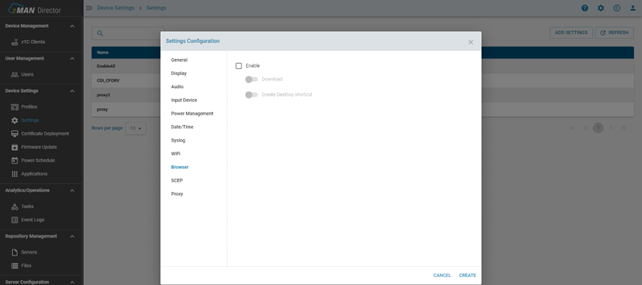
Supported Settings
The Settings section supports multiple configuration areas, including:
- Display
- Audio
- Input Device
- Power Management
- Date and Time
- Syslog
- Wi-Fi
- SCEP
- Proxy
- VDI & Browser
These settings allow administrators to manage common device behavior centrally instead of configuring each zTC manually.
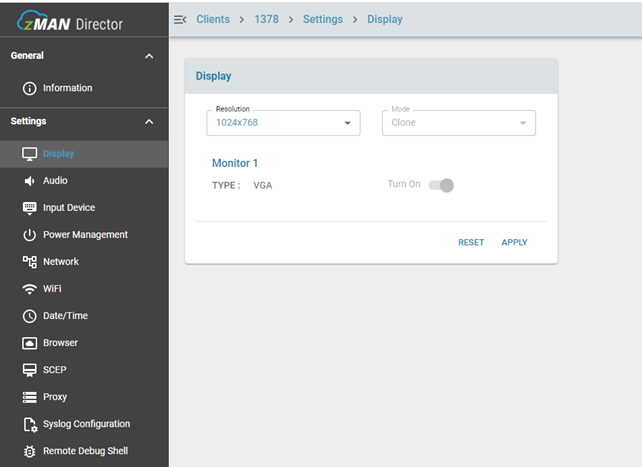
Display Settings
Display settings allow administrators to configure monitor resolution and supported display modes such as extended or clone mode.
The settings page may display multiple monitor configuration options, even if a specific zTC device has fewer monitors connected.
Audio Settings
Audio settings allow administrators to manage volume, microphone level, mute, and unmute behavior for managed zTC devices.
Input Device Settings
Input Device settings allow administrators to configure mouse behavior, including mouse speed and button swap options.
Power Management Settings
Power Management settings allow administrators to enable or disable Wake on LAN and Wake on USB for managed zTC devices.
Date and Time Settings
Date and Time settings allow administrators to configure the device time zone and NTP synchronization behavior.
Syslog Settings
Syslog settings allow administrators to configure a syslog server for collecting zTC device logs.

Wi-Fi Settings
Wi-Fi settings allow administrators to configure wireless network settings for managed zTC devices.
SCEP Settings
SCEP settings allow administrators to configure Simple Certificate Enrollment Protocol settings for certificate-based workflows.
Proxy Settings
Proxy settings allow administrators to configure network proxy behavior.
Supported proxy options may include:
- Auto
- Manual
- Disabled
VDI & Browser Settings
VDI & Browser settings allow administrators to control VDI protocol behavior and browser-related options.
These options may include browser download behavior, desktop shortcut creation, session preferences, and allowed URLs depending on deployment configuration.
Applying Settings
Once a settings configuration is created, it can be applied to individual zTC devices or groups of devices.
Administrators may also be able to edit or delete existing settings configurations depending on permissions.
Notes
- Settings are generic device-level configurations and may not reflect the exact hardware layout of every individual zTC.
- Some system settings changed directly on the zTC may not immediately reflect in zMan Director.
- Settings availability may vary depending on device firmware version and deployment configuration.
Related Articles
- List
- Device Information and Settings
- Display
- Audio
- Input Device
- Power Management
- Date and Time
- Syslog
- Wi-Fi
- SCEP
- Proxy
- VDI & Browser