
-
SnapOS
-
-
- Articles coming soon
-
-
-
- Citrix HDX + USB Headset (Call-Center Baseline)
- OS/Firmware Update & Rollback
- Power Management and Session State
- Wi-Fi Roaming & Link Change Mid-Session
- Kiosk / Assigned-Access Auto-Launch
- Barcode Scanner (HID) with Line-of-Business App
- Printing to Local USB & Network Printers
- USB Device Management – Block Storage
- Multi-Monitor & 4K Performance
- Microsoft AVD/RDP + Teams Optimized Video
- VMware Horizon + Smart Card / CAC Login
-
-
-
-
zWAN
-
-
-
-
- Firewall & Layer 7 Application Filtering
- VPN Site-to-Site Tunnel Setup & Connectivity (z40 to Cloud vGR)
- Intrusion Prevention System (IPS) / Intrusion Detection System (IDS) Testing
- DNS Filtering
- DDoS Protection & Logging
- MAC Address Filtering & Geo-fencing
- Application Control & Protocol Blocking
- Authentication & Access Control (zID)
-
- WAN Link Failover & Load Balancing (ACI Mode)
- Dynamic Path Selection & Application-Aware Routing
- SaaS & Internet Breakout Validation
- QoS for Microsoft Teams (Datacenter vGR + Branch z40)
- Tunnel Failover (z40 ↔ vGR) — WAN00 (wired) primary, WAN03 (4G) & WAN04 (5G) backups
- IP Routing & Static Route Steering (z40 Branch)
- VLAN & Layer-2 Bridging
-
-
-
-
-
-
- Articles coming soon
-
-
-
-
- Articles coming soon
-
- Articles coming soon
-
-
-
-
-
-
- Articles coming soon
-
- Articles coming soon
-
- Articles coming soon
-
- Articles coming soon
-
-
-
-
-
- Articles coming soon
-
- Articles coming soon
-
- Articles coming soon
-
- Articles coming soon
-
-
-
-
-
- Articles coming soon
-
- Articles coming soon
-
- Articles coming soon
-
- Articles coming soon
-
-
- Articles coming soon
-
- IPsec Tunnel not Establishing
- SSL-VPN Tunnel not Establishing
- Mobile Network Issues
- Management Tunnel does not Establish
- DNS not Resolving from Local Network Appliance
- DNS Resolution Issues in Tunnel Configuration
- DHCP Server not Leasing IP to LAN PC
- Debugging EC Events - Unknown Status Issue
- Trusted-MAC Geofencing Issues
- DNS Issues from DC LAN PC
- Troubleshooting LAN Connectivity to Internet via WAN, Remote Branch LAN, or Local Branch LAN
- NetBalancer gateways displaying Faulty/Inactive
- Packet Drop Issues
-
-
zAccess
-
StorTrends
zMan Director – Firmware Update Recommendation Guide
1. Overview
zMan Director provides a flexible and scalable framework for managing firmware updates across SnapOS (zTC) endpoints.
Depending on network architecture, security constraints, and endpoint distribution, different deployment models can be used to optimize firmware delivery, performance, and security.
This guide outlines recommended deployment patterns and helps administrators choose the most suitable approach for their environment.
2. Key Capabilities of Firmware Distribution
zMan Director, together with zDM, provides an optimized and controlled firmware distribution mechanism designed for performance, scalability, and reliability.
Intelligent Firmware Caching
Firmware updates are distributed through zDM servers, which include a built-in caching mechanism.
- Firmware images are downloaded once and stored locally within zDM
- Subsequent endpoint updates are served directly from the cache
- Eliminates repeated downloads from the source (MinIO or AWS S3)
Impact:
- Significantly reduces bandwidth consumption
- Improves update speed, especially for remote or branch environments
- Ensures consistent performance across distributed networks
Controlled Distribution with Concurrency Management
zDM provides built-in rate control by managing how many endpoints can download firmware simultaneously.
- Administrators can define concurrency limits
- Endpoints are queued when limits are reached
- New downloads begin automatically as active updates complete
Impact:
- Prevents network congestion and bandwidth spikes
- Avoids overloading firmware sources
- Enables predictable and stable rollout of updates across large environments
Efficient and Scalable Delivery Model
By combining caching and controlled distribution:
- Firmware is delivered efficiently across both local and remote environments
- Network load is minimized even during large-scale updates
- The system scales seamlessly as the number of endpoints increases
These capabilities form the foundation of all deployment models described in the following sections.
3. Choosing the Right Firmware Update Approach
Firmware update strategy in zMan depends on:
- Network accessibility (private vs internet-facing)
- Endpoint location (corporate vs remote)
- Security requirements (air-gapped vs controlled access)
- Scale of deployment
3.1 Firmware Source Considerations
Firmware can be hosted using either of the following:
- MinIO (within zMan Director) – Recommended for controlled, private, or air-gapped environments
- Amazon S3 – Suitable for simplified distribution or when firmware is externally managed
General Guidance:
-
Use MinIO when:
- Operating in restricted or private environments
- Full control over firmware distribution is required
- Internet access is limited or not available
-
Use Amazon S3 when:
- External hosting is preferred
- Simplified firmware distribution is needed
- Controlled internet access is available
The choice of firmware source does not change the deployment architecture, as zDM handles caching and delivery in all scenarios.
4. Recommended Deployment Scenarios
4.1 Hybrid Deployment (Corporate + Remote Endpoints)
When to use:
- Endpoints are distributed across corporate networks and remote/home users
- zMan Director is hosted within a private network
- Remote endpoints should not directly access internal infrastructure
Recommended Setup:
- zMan Director with MinIO (preferred) or AWS S3
- On-prem zDM for corporate endpoints
- Cloud-hosted zDM for remote endpoints
Why this works:
- Cloud zDM securely connects to zMan to retrieve firmware
- On-prem zDM efficiently serves local endpoints
- Remote endpoints use cloud zDM without requiring access to internal networks
- Firmware caching at zDM improves performance and reduces bandwidth usage
The following diagram illustrates a hybrid deployment supporting both corporate and remote endpoints:

Figure: Hybrid deployment where cloud zDM connects securely to private zMan, while corporate and remote endpoints use their nearest zDM for firmware delivery.
4.2 Controlled / Air-Gapped Deployment
When to use:
- Strict security or compliance requirements
- zMan Director and endpoints must not have internet access
- Only controlled components are allowed external connectivity
Recommended Setup:
- zMan Director with MinIO (preferred)
- Optional: AWS S3 (only in controlled internet scenarios)
- zDM as the only component with internet access (if S3 is used)
- zMan Director and endpoints remain isolated from the internet
Why this works:
- Firmware can be fully managed internally using MinIO
- In controlled environments, zDM can securely fetch from AWS S3
- Firmware is cached locally within the environment
- Endpoints receive updates without direct internet access
- Maintains strict security boundaries

Figure: Controlled deployment where firmware is managed internally (MinIO) or optionally fetched by zDM from AWS S3, while zMan and endpoints remain isolated.
4.3 Large Scale / Distributed Deployment
When to use:
- Large number of endpoints across multiple regions or sites
- Need to reduce WAN bandwidth usage and latency
- Centralized management with distributed firmware delivery
Recommended Setup:
- zMan Director with MinIO or AWS S3
- Multiple zDM servers deployed across regions/sites
- Endpoints connected to the nearest zDM
Why this works:
- Firmware is cached locally in each region
- Reduces WAN traffic and improves download speed
- Enhances reliability and update success rates
- Scales efficiently as the number of endpoints grows
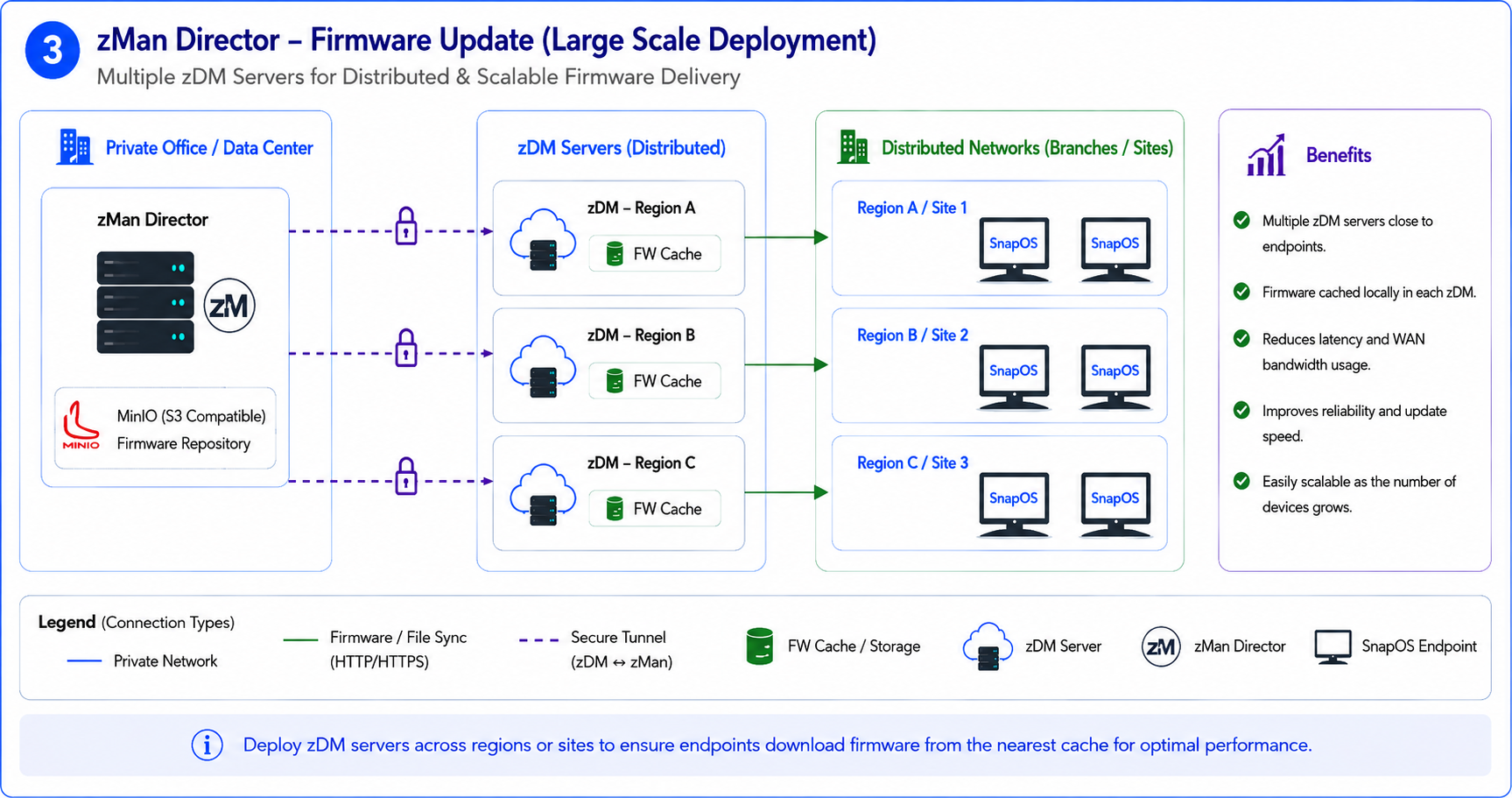
Figure: Distributed deployment using multiple zDM servers to ensure scalable and efficient firmware delivery.
5. Key Deployment Recommendations
To achieve optimal firmware update performance and reliability, consider the following:
- Deploy cloud-hosted zDM when supporting remote or home-based users
- Use on-prem zDM for corporate environments to ensure efficient local distribution
- Place zDM servers closer to endpoints to reduce latency and improve performance
- For large deployments, use multiple zDM servers across regions or sites
- Configure concurrency limits appropriately to balance performance and network usage
6. Summary
zMan Director supports multiple deployment models to address different operational needs.
By selecting the appropriate architecture:
- Firmware delivery becomes faster and more efficient
- Network load is optimized through caching
- Security requirements are maintained
- Deployment scales seamlessly with organizational growth
This recommendation-based approach enables efficient and reliable firmware management across diverse deployment environments.