
-
SnapOS
-
-
- Articles coming soon
-
-
-
- Citrix HDX + USB Headset (Call-Center Baseline)
- OS/Firmware Update & Rollback
- Power Management and Session State
- Wi-Fi Roaming & Link Change Mid-Session
- Kiosk / Assigned-Access Auto-Launch
- Barcode Scanner (HID) with Line-of-Business App
- Printing to Local USB & Network Printers
- USB Device Management – Block Storage
- Multi-Monitor & 4K Performance
- Microsoft AVD/RDP + Teams Optimized Video
- VMware Horizon + Smart Card / CAC Login
-
-
-
-
zWAN
-
-
-
-
- Firewall & Layer 7 Application Filtering
- VPN Site-to-Site Tunnel Setup & Connectivity (z40 to Cloud vGR)
- Intrusion Prevention System (IPS) / Intrusion Detection System (IDS) Testing
- DNS Filtering
- DDoS Protection & Logging
- MAC Address Filtering & Geo-fencing
- Application Control & Protocol Blocking
- Authentication & Access Control (zID)
-
- WAN Link Failover & Load Balancing (ACI Mode)
- Dynamic Path Selection & Application-Aware Routing
- SaaS & Internet Breakout Validation
- QoS for Microsoft Teams (Datacenter vGR + Branch z40)
- Tunnel Failover (z40 ↔ vGR) — WAN00 (wired) primary, WAN03 (4G) & WAN04 (5G) backups
- IP Routing & Static Route Steering (z40 Branch)
- VLAN & Layer-2 Bridging
-
-
-
-
-
-
- Articles coming soon
-
-
-
-
- Articles coming soon
-
- Articles coming soon
-
-
-
-
-
-
- Articles coming soon
-
- Articles coming soon
-
- Articles coming soon
-
-
-
-
-
- Articles coming soon
-
- Articles coming soon
-
- Articles coming soon
-
-
-
-
-
- Articles coming soon
-
- Articles coming soon
-
- Articles coming soon
-
-
- Articles coming soon
-
- IPsec Tunnel not Establishing
- SSL-VPN Tunnel not Establishing
- Mobile Network Issues
- Management Tunnel does not Establish
- DNS not Resolving from Local Network Appliance
- DNS Resolution Issues in Tunnel Configuration
- DHCP Server not Leasing IP to LAN PC
- Debugging EC Events - Unknown Status Issue
- Trusted-MAC Geofencing Issues
- DNS Issues from DC LAN PC
- Troubleshooting LAN Connectivity to Internet via WAN, Remote Branch LAN, or Local Branch LAN
- NetBalancer gateways displaying Faulty/Inactive
- Packet Drop Issues
-
-
zAccess
-
StorTrends
Link Layer Discovery Protocol
Overview
The Link Layer Discovery Protocol (LLDP) is a vendor-neutral Layer 2 protocol that allows network devices to advertise their identities and capabilities to neighbors on a local Ethernet network. In a routing environment, LLDP is essential for mapping physical topology and troubleshooting cabling issues without needing physical access to the rack.
Configuration
- Enable LLDP to start a discovery

Clicking on Status, redirects to a page where the following options can be viewed
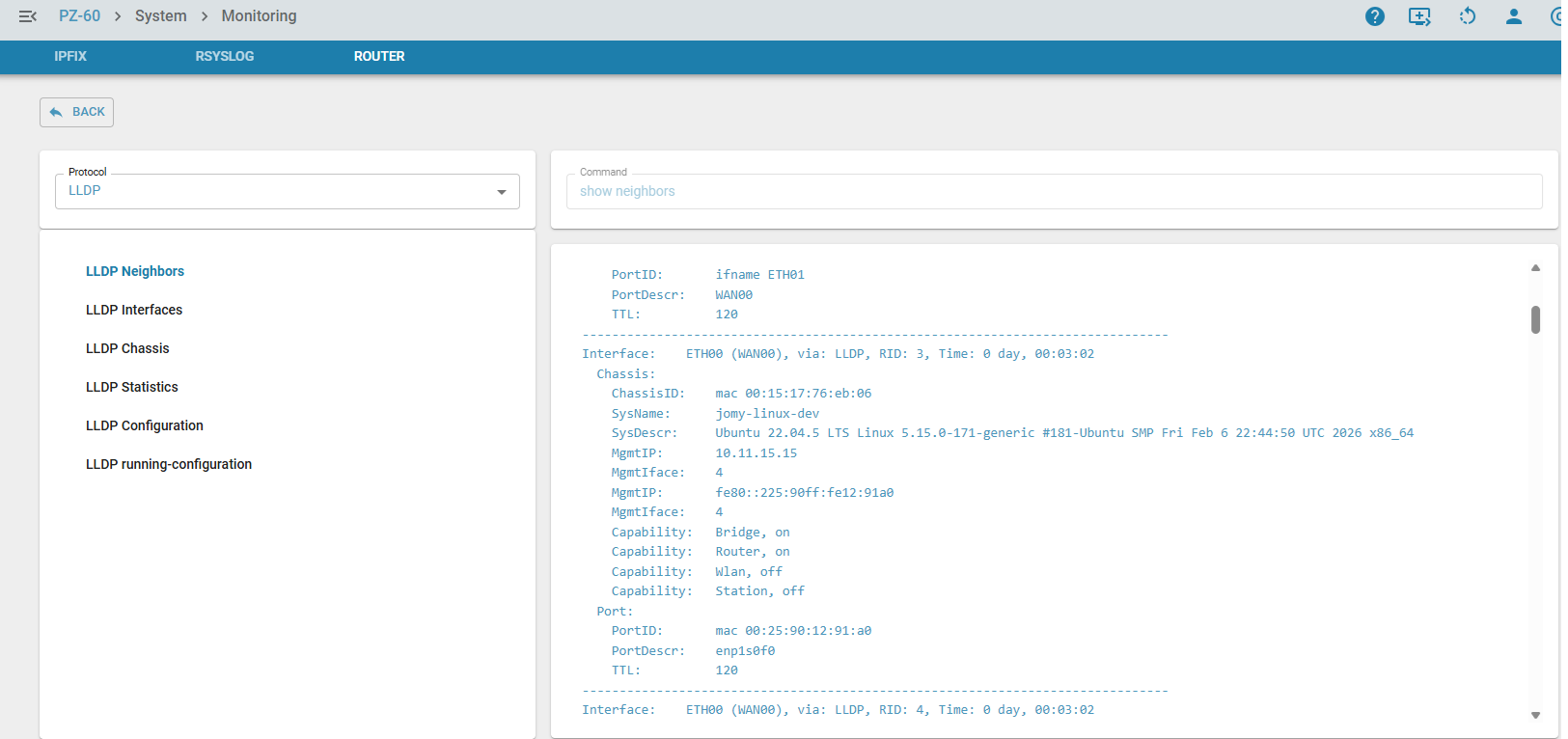
Neighbor Discovery
This is the most common command used to see what is physically plugged into your interfaces.
Details: Displays the System Name, Chassis ID (MAC), Port ID, and Capabilities (Router, Bridge, etc.) of connected devices.
Interface Status
Use this to verify which local ports are actively participating in LLDP.
Details: Shows the status of local ports, including whether they are currently administrative "up" and sending discovery packets.

Local System Info
Displays how the EC identifies itself to the rest of the network.
Details: Provides the local Chassis ID, System Name, and System Description (e.g., kernel version and hardware model like BPI-R4).

Performance Metrics
Essential for troubleshooting packet loss or protocol mismatches.
Details: Tracks the number of LLDP frames sent, received, discarded, or unrecognized. High discard rates may indicate a mismatched TLV (Type-Length-Value) configuration.

Active Configuration
Displays the global settings currently applied to the LLDP daemon.
Details: Shows global timers (transmit delay, hold time) and which optional TLVs (like Management IP or System Power) are enabled for broadcast.

Current State or Running Configuration
Provides a comprehensive view of the active, in-memory settings.
Details: This outputs the current operational parameters, reflecting any changes made during the current session before they are committed to a permanent config file.
