
-
SnapOS
-
-
- Articles coming soon
-
-
-
- Citrix HDX + USB Headset (Call-Center Baseline)
- OS/Firmware Update & Rollback
- Power Management and Session State
- Wi-Fi Roaming & Link Change Mid-Session
- Kiosk / Assigned-Access Auto-Launch
- Barcode Scanner (HID) with Line-of-Business App
- Printing to Local USB & Network Printers
- USB Device Management – Block Storage
- Multi-Monitor & 4K Performance
- Microsoft AVD/RDP + Teams Optimized Video
- VMware Horizon + Smart Card / CAC Login
-
-
-
-
zWAN
-
-
-
-
- Firewall & Layer 7 Application Filtering
- VPN Site-to-Site Tunnel Setup & Connectivity (z40 to Cloud vGR)
- Intrusion Prevention System (IPS) / Intrusion Detection System (IDS) Testing
- DNS Filtering
- DDoS Protection & Logging
- MAC Address Filtering & Geo-fencing
- Application Control & Protocol Blocking
- Authentication & Access Control (zID)
-
- WAN Link Failover & Load Balancing (ACI Mode)
- Dynamic Path Selection & Application-Aware Routing
- SaaS & Internet Breakout Validation
- QoS for Microsoft Teams (Datacenter vGR + Branch z40)
- Tunnel Failover (z40 ↔ vGR) — WAN00 (wired) primary, WAN03 (4G) & WAN04 (5G) backups
- IP Routing & Static Route Steering (z40 Branch)
- VLAN & Layer-2 Bridging
-
-
-
-
-
-
- Articles coming soon
-
-
-
-
- Articles coming soon
-
- Articles coming soon
-
-
-
-
-
-
- Articles coming soon
-
- Articles coming soon
-
- Articles coming soon
-
- Articles coming soon
-
-
-
-
-
- Articles coming soon
-
- Articles coming soon
-
- Articles coming soon
-
- Articles coming soon
-
-
-
-
-
- Articles coming soon
-
- Articles coming soon
-
- Articles coming soon
-
- Articles coming soon
-
-
- Articles coming soon
-
- IPsec Tunnel not Establishing
- SSL-VPN Tunnel not Establishing
- Mobile Network Issues
- Management Tunnel does not Establish
- DNS not Resolving from Local Network Appliance
- DNS Resolution Issues in Tunnel Configuration
- DHCP Server not Leasing IP to LAN PC
- Debugging EC Events - Unknown Status Issue
- Trusted-MAC Geofencing Issues
- DNS Issues from DC LAN PC
- Troubleshooting LAN Connectivity to Internet via WAN, Remote Branch LAN, or Local Branch LAN
- NetBalancer gateways displaying Faulty/Inactive
- Packet Drop Issues
-
-
zAccess
-
StorTrends
Tasks
Overview
Tasks in zMan Director provide visibility into operations that have been applied to individual zTC devices or groups of devices.
When administrators apply Profiles, Firmware Update, or Settings to a single device or group of devices, zMan Director creates a task. The Tasks page can be used to monitor the progress and result of those operations.
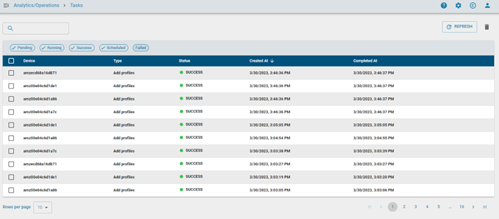
Task Tracking
The Tasks page displays task records created by device management operations.
Task records may include information such as:
- Device
- Task type
- Status
- Created time
- Completed time
This allows administrators to confirm whether an operation was completed successfully or requires further review.
Task Status
Tasks may show status values such as:
- Pending
- Running
- Success
- Failed
- Scheduled
Status values help administrators understand whether an operation is still in progress or has completed.
Common Task Sources
Tasks may be created when administrators apply:
- Profiles
- Firmware updates
- Settings
These tasks can be created for individual zTC devices or groups of devices.
Monitoring Operations
Administrators can use the Tasks page to review the progress and outcome of applied operations.
This is useful when validating changes across multiple devices or when troubleshooting failed operations.
Notes
- Tasks are created when supported operations are applied to devices or groups.
- Task results can be used to confirm whether the requested operation completed successfully.
- Some tasks may remain in progress while a device is offline, rebooting, or performing another operation.