
Web Apps
Overview
This section provides a high-level overview of the WebApps feature and its purpose within the zWAN platform.
Document Scope
This document describes the functionality, detection mechanisms, workflows, UI behavior, limitations, and future enhancements related to the WebApps feature in zWAN. It outlines what WebApps are, how they operate within the system, how administrators can configure them, and how they integrate with other components such as the FlowClassifier, NetBalancer, QoS, and Firewall modules.
Introduction
The zWAN WebApps feature is primarily designed to model internal business or intranet applications that consist of multiple domains, IPs, and service endpoints. Instead of managing each component separately, administrators can bundle them into a single application profile for easier control and policy enforcement.These application profiles can then be used for traffic classification, prioritization, categorization, security policies, and routing decisions.
WebApps serve as a configurable abstraction layer enabling:
- Simplified application recognition
- Streamlined user-defined policies
- Improved clarity for network administrators
Core Functionalities of WebApps
A WebApp is created to achieve the following:
- Group related domains under one logical application.
- Steer, classify, or block all domains/IPs tied to the application using a single selector.
- Allow user-defined naming of applications.
- Associate known IP addresses with the application.
- Associate IP/port/protocol combinations with the application.
- Provide domain categories related to the application.
- Classify applications as trusted or SaaS.
- Bypass IPS/IDS inspection for the application.
- Bypass DNS classification or filtering.
- When enabled, domains configured under a WebApp bypass DNS-based classification and filtering.
- To avoid policy conflicts, domains with bypassDNS enabled are validated against globally blocked categories.
- If a domain belongs to a blocked category:
- WebApp creation or update is restricted.
- Category configuration is also restricted if it conflicts with existing WebApps.
- This ensures consistent enforcement across WebApp configuration and global category policies.
- Bypass SSL inspection.
- Enable custom business application grouping for granular traffic steering.
Detection Workflow and Deep Dive
Once a WebApp is configured, zWAN uses several subsystems in combination to identify flows associated with that WebApp.
Detection Mechanisms
- nDPI-based detection:
- Enabled using user-provided IPs, domains, and metadata.
- Identifies application traffic directly from flow characteristics.
- DNS-based discovery:
- Learns IP addresses for configured FQDNs.
- Matches subsequent flows against discovered IPs.
- IP/Port/Protocol matching:
- Uses ipsets managed by zWAN.
- Enables deterministic classification of application-bound traffic.
- TLS SNI-based identification:
- Matches configured FQDNs through xt_tls inspection.
Policy Enforcement After Detection
Once a flow is identified as belonging to a WebApp, zWAN applies global policies such as:
- SaaS application marking
- SSL inspection bypass
- IPS/IDS bypass
- DNS filter bypass
Additionally, Flow Classifier–based policies in Firewall/NetBalancer/QoS modules can be applied to WebApps. This results in rules or packet marking specific to the detected application.
Functionalities Provided by WebApps in zWAN
- Create WebApp with:
- FQDN list (e.g., internal/intranet applications like a self-hosted GitLab or Redmine)
- IP/Port/Protocol list
- Categories
- Global bypass policies
Note:
If bypassDNS is enabled and a domain belongs to a blocked category, the system will prevent saving the configuration and display an appropriate error message.
- Edit WebApp to update any of the above attributes.
- Delete WebApp can be deleted one at a time.
- List WebApps, with search and sort capabilities.
- Use WebApps in NetBalancer/Firewall/QoS FlowClassifier modules to apply traffic steering, prioritization, and security policies based on business applications.
UI Functionalities
Create WebApp
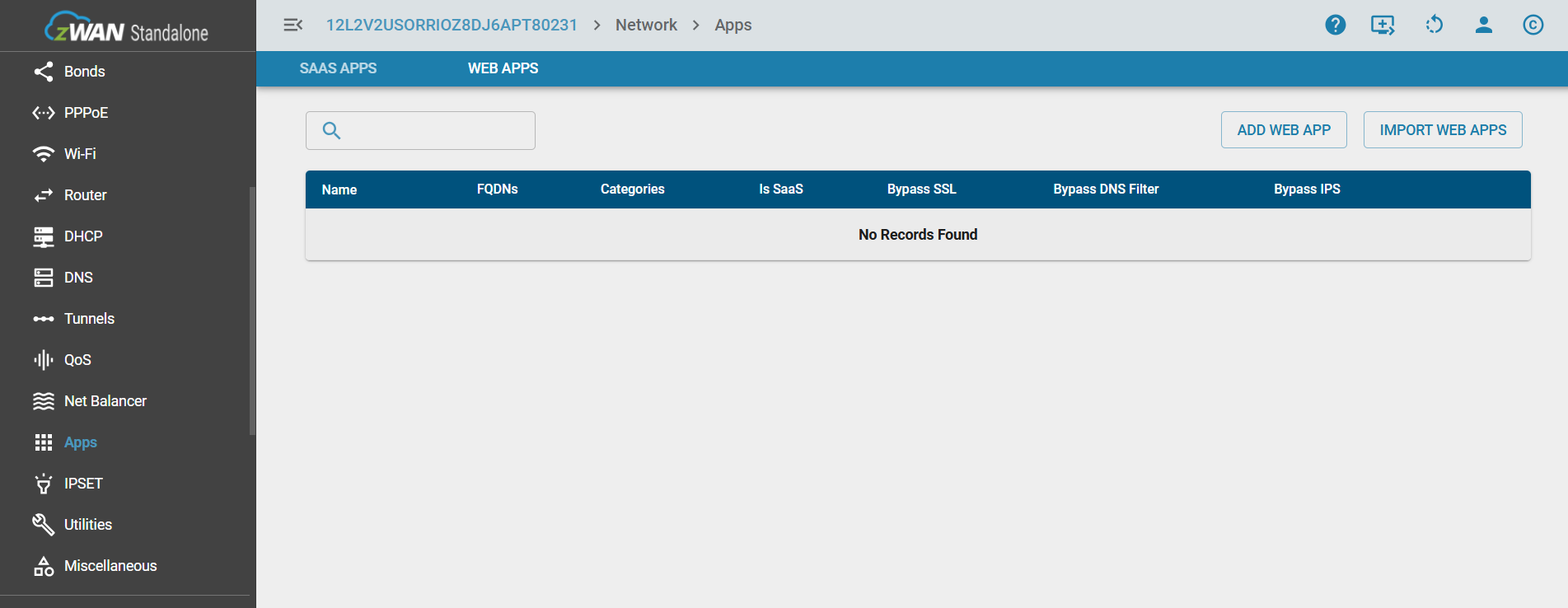
To create a new WebApp, navigate to the Apps section in the UI and select the Web App tab. Click the ADD WEB APP button. Provide known information such as domain names, IP addresses, ports, and any relevant metadata. Select the appropriate global policies before saving the configuration.
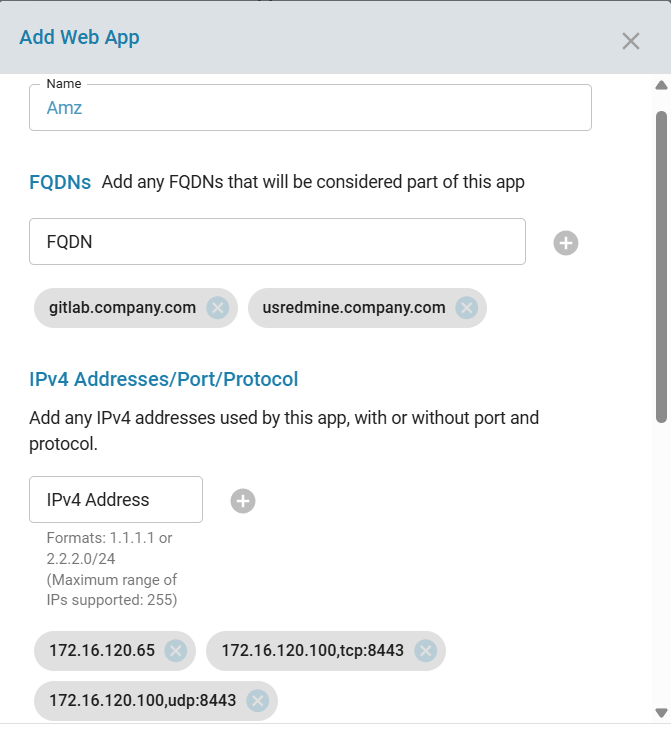
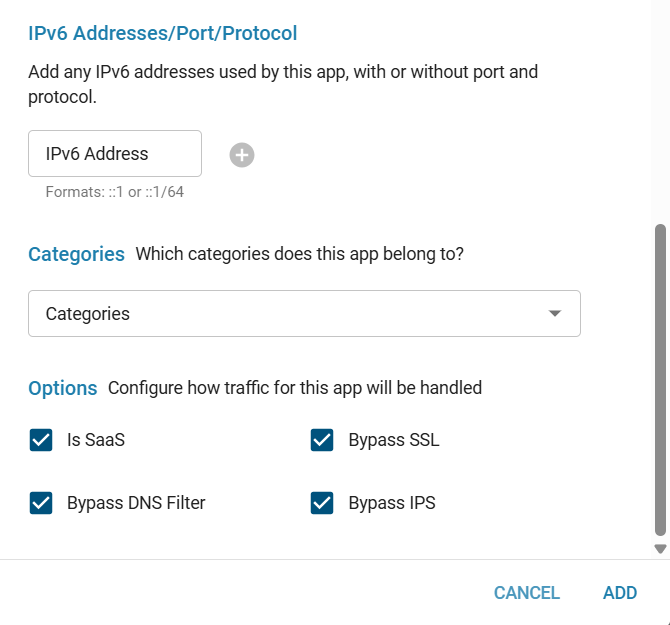
- While selecting a global policy, during web app creation, domains that belong to a blocked category cannot be bypassed through DNS filtering. This is especially relevant for large applications such as Facebook, Instagram, etc.
- These applications do not rely on a single domain. Instead, they use multiple CDNs, subdomains, and related services, all of which may fall under the same category. Therefore, bypassing just one domain is not sufficient, as many dependent domains are still subject to filtering.
To handle such cases effectively:
- Multiple domains and subdomains would need to be bypassed.
- These domains are often dynamically resolved and categorized under the same blocked category.
- Managing them individually becomes impractical.
As a result:
- If a category is marked as blocked, domains within that category cannot be selectively bypassed for DNS filtering.
- This ensures consistency in enforcement and avoids partial or ineffective bypass configurations for large-scale web applications.
Conversely:
- If domains under a web app are configured to bypass DNS filtering in the global policy, the corresponding category cannot be blocked while DNS bypass is enabled.
Edit WebApp
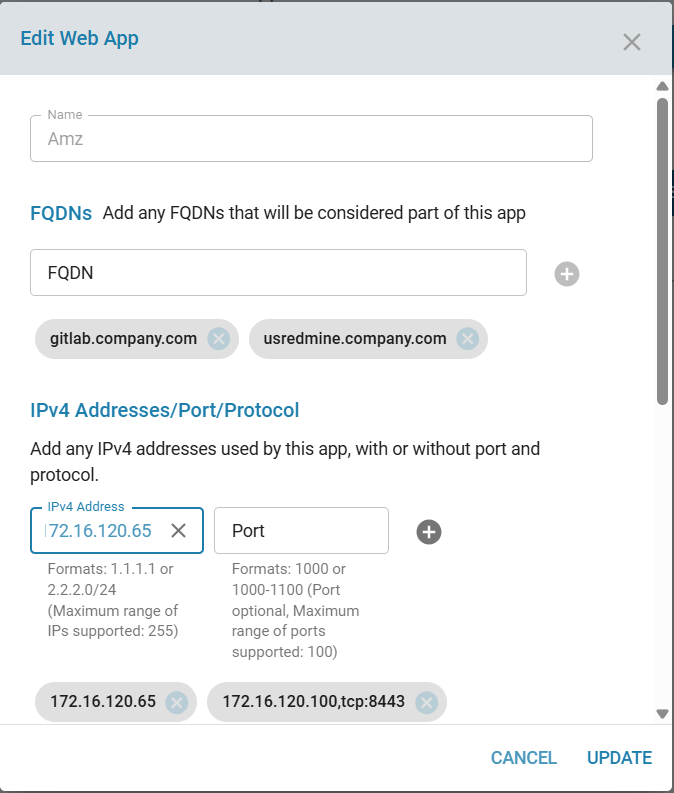
An existing WebApp can be modified by clicking the edit (pen) icon. You may change, add, or delete configuration parameters. Click Update to save the changes.
Delete WebApp
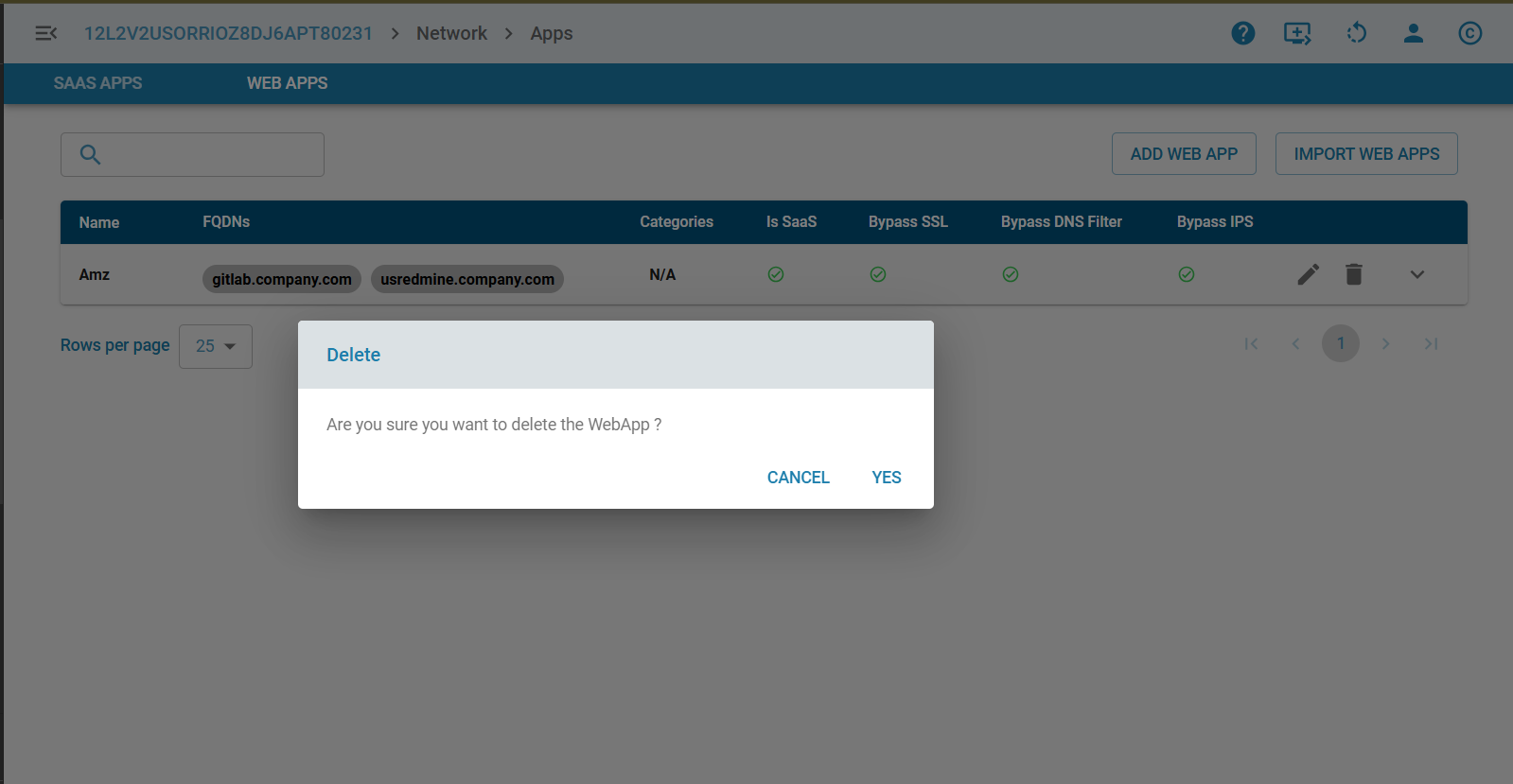
Each WebApp can be deleted individually using the trash icon.
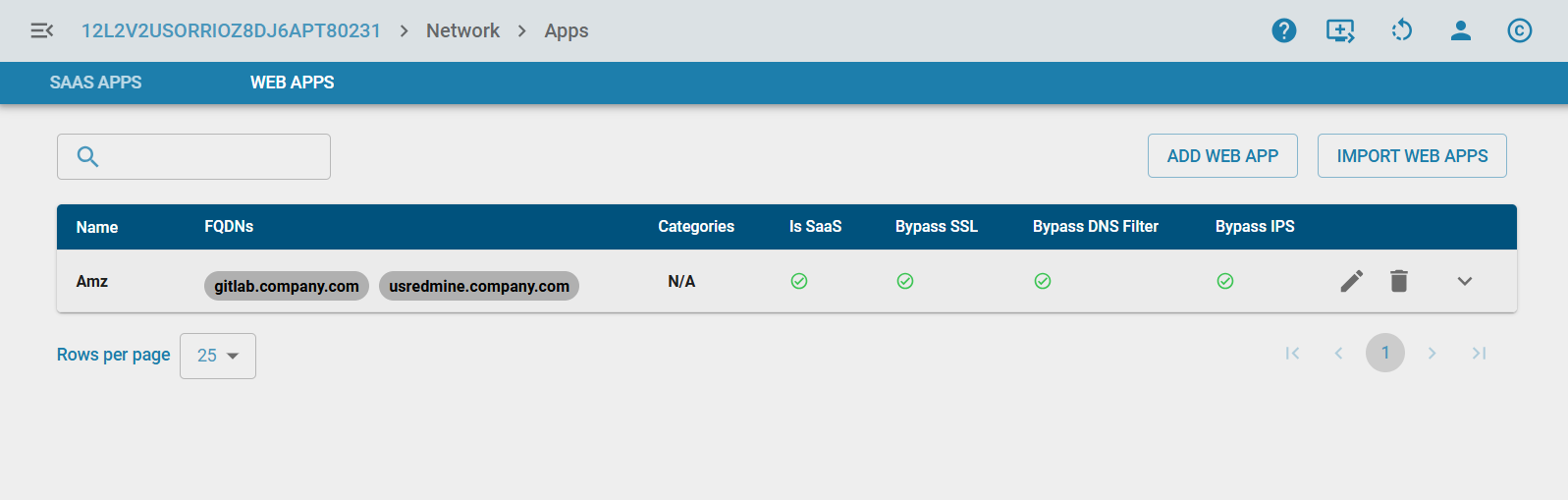
List WebApps
Displays all created WebApps along with their associated configuration details.
Import WebApps
When managing multiple WebApps across several CPEs, configurations can be imported from a file to avoid repetitive manual data entry. Click the IMPORT WEB APPS button to upload a WebApp configuration file.
Next Release:
Bulk import support will be removed. Import will be restricted to one WebApp at a time to prevent UI timeouts.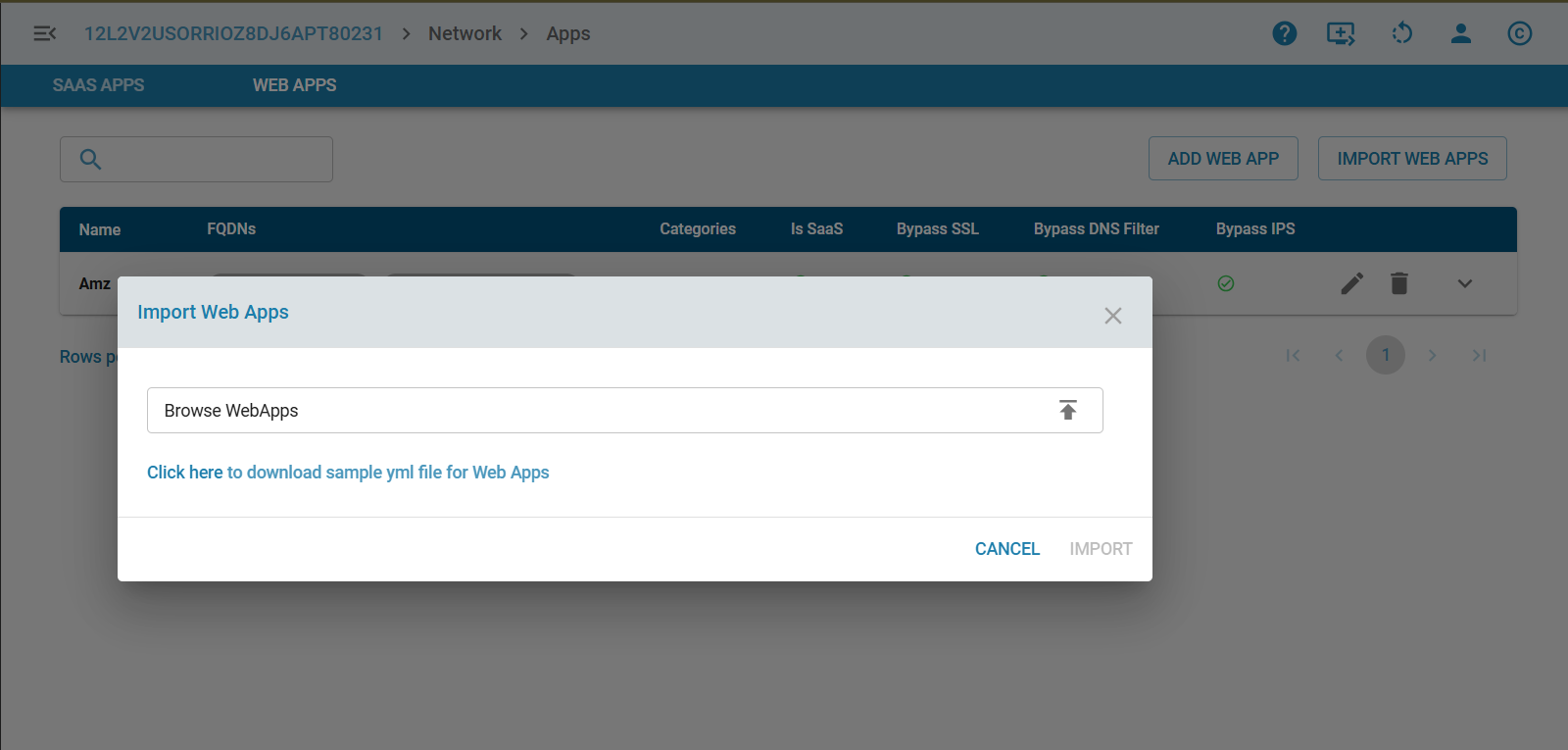
Flow Classification
Webapp section is added under flow classification UI of Firewall Rules/NetBalancer/QoS pages to create granular rules instead of using global policies.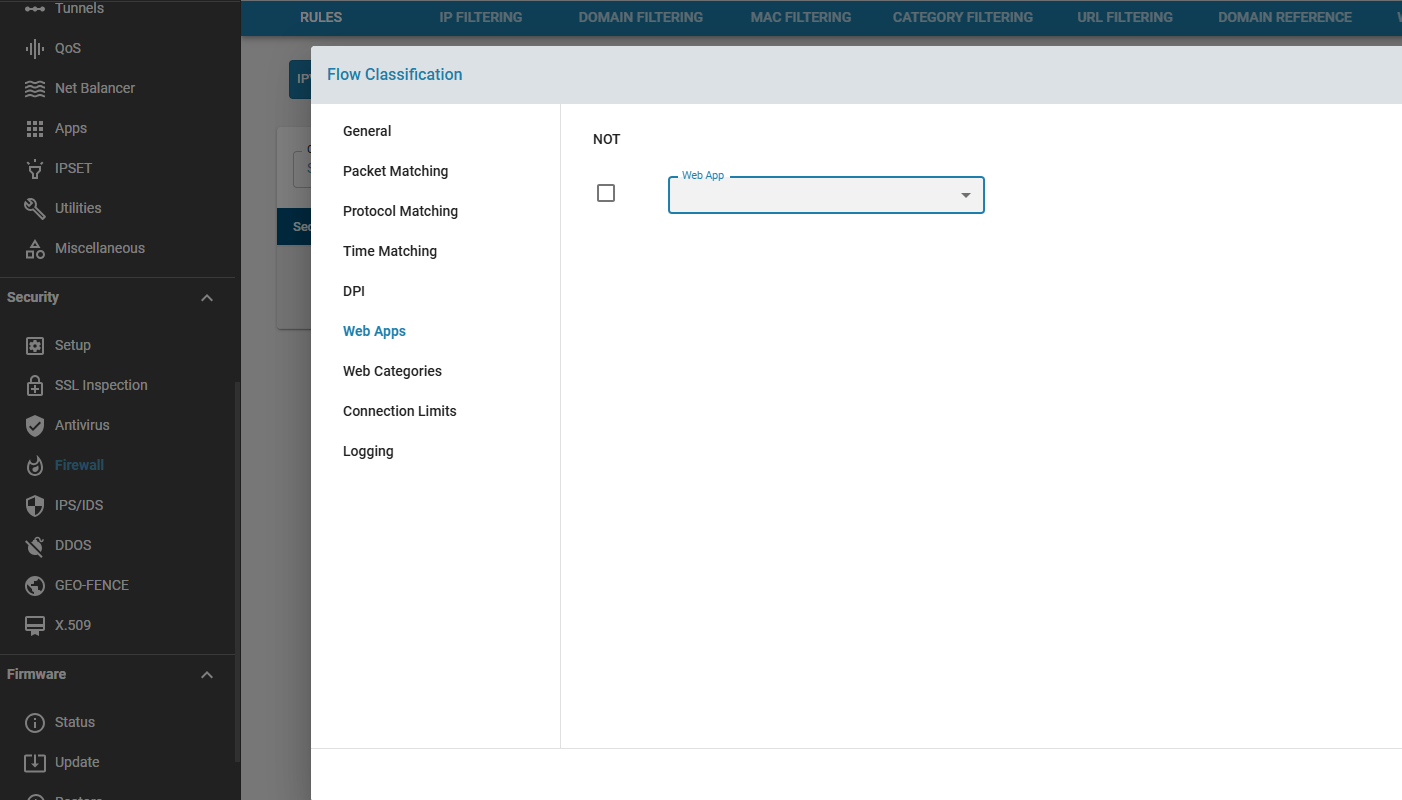
Analytics and Reporting
WebApps will enable unified analytics by aggregating traffic across all associated domains, IPs, ports, and protocols into a single application entity. This will provide:
- Consolidated reporting for each application.
- Visibility into traffic volume, flow counts, bandwidth usage, and security events mapped to the WebApp.
- Insights into domain-level activity while still presenting a unified application-level summary.
- Improved troubleshooting and performance monitoring by correlating all related flows under one logical application.
Future Enhancements
- Automatic WebApp detection through periodic packet capture (pcap) and machine‑learning–based flow analysis.
- Auto-learning WebApp definitions for unknown or emerging applications.
Limitations
- DNS-based identification works only if DNS traffic is routed via the zWAN CPE.
- Shared web hosting may cause incorrect WebApp identification using DNS-derived IPs.
- TLS-based detection applies only to HTTPS traffic.
- Bypassing SSL and Traffic Steering depends on first packet detection.
- nDPI detection is limited to what the nDPI library supports.
- Due to the above, certain WebApps may not always be accurately identified.
- DNS Caching and Policy Enforcement Delay
- Previously resolved IP addresses for a domain or URL may continue to be used until the DNS cache expires or is refreshed.
- As a result, a domain or URL may remain accessible for a short period after a blocking policy is applied, or may remain blocked after being allowed.
- The updated policy will take effect only after the relevant cache entries are cleared or expire.
Summary
The WebApps feature enhances visibility and control over internal or intranet application traffic in zWAN. By integrating multiple detection mechanisms and providing administrator-driven application grouping, WebApps simplify complex network classification tasks. They form a foundation for richer enterprise traffic management, prioritization, and security capabilities while reducing the operational overhead associated with domain-by-domain configuration.