
-
SnapOS
-
-
- Articles coming soon
-
-
-
- Citrix HDX + USB Headset (Call-Center Baseline)
- OS/Firmware Update & Rollback
- Power Management and Session State
- Wi-Fi Roaming & Link Change Mid-Session
- Kiosk / Assigned-Access Auto-Launch
- Barcode Scanner (HID) with Line-of-Business App
- Printing to Local USB & Network Printers
- USB Device Management – Block Storage
- Multi-Monitor & 4K Performance
- Microsoft AVD/RDP + Teams Optimized Video
- VMware Horizon + Smart Card / CAC Login
-
-
-
-
zWAN
-
-
-
-
- Firewall & Layer 7 Application Filtering
- VPN Site-to-Site Tunnel Setup & Connectivity (z40 to Cloud vGR)
- Intrusion Prevention System (IPS) / Intrusion Detection System (IDS) Testing
- DNS Filtering
- DDoS Protection & Logging
- MAC Address Filtering & Geo-fencing
- Application Control & Protocol Blocking
- Authentication & Access Control (zID)
-
- WAN Link Failover & Load Balancing (ACI Mode)
- Dynamic Path Selection & Application-Aware Routing
- SaaS & Internet Breakout Validation
- QoS for Microsoft Teams (Datacenter vGR + Branch z40)
- Tunnel Failover (z40 ↔ vGR) — WAN00 (wired) primary, WAN03 (4G) & WAN04 (5G) backups
- IP Routing & Static Route Steering (z40 Branch)
- VLAN & Layer-2 Bridging
-
-
-
-
-
-
- Articles coming soon
-
-
-
-
- Articles coming soon
-
- Articles coming soon
-
-
-
-
-
-
- Articles coming soon
-
- Articles coming soon
-
- Articles coming soon
-
- Articles coming soon
-
-
-
-
-
- Articles coming soon
-
- Articles coming soon
-
- Articles coming soon
-
- Articles coming soon
-
-
-
-
-
- Articles coming soon
-
- Articles coming soon
-
- Articles coming soon
-
- Articles coming soon
-
-
- Articles coming soon
-
- IPsec Tunnel not Establishing
- SSL-VPN Tunnel not Establishing
- Mobile Network Issues
- Management Tunnel does not Establish
- DNS not Resolving from Local Network Appliance
- DNS Resolution Issues in Tunnel Configuration
- DHCP Server not Leasing IP to LAN PC
- Debugging EC Events - Unknown Status Issue
- Trusted-MAC Geofencing Issues
- DNS Issues from DC LAN PC
- Troubleshooting LAN Connectivity to Internet via WAN, Remote Branch LAN, or Local Branch LAN
- NetBalancer gateways displaying Faulty/Inactive
- Packet Drop Issues
-
-
zAccess
-
StorTrends
Class Manager (QoS)
Overview
The basic functionality of the Flow Classification is to apply various filter over network packet and take or assist to take an specific action if the network packets matches the particular rule.
Functionality
Flow Classification is used in the following Chains in ZWAN Controller:
- Flow Optimizer ; Chain name: NetBalancer
- Firewall ; Chain name: Forward/Input/Output (or custom chain which is linked to the existing one)
- Quality of Service (Traffic Shaping) ; Chain name: QoS
Based on where it is used the target action will vary.
Network Packet -> Filter -> Action
Routing - Flow Optimization:
In the case of Routing, the filter is applied over incoming packets. If the packet matches the filter, then the action could be routing the those packet via a specific interface. The interface could be Ethernet Interface (or IPSec Tunnel interface) or an Gateway IP.
Bandwidth Control - QoS:
In the case of QoS, the output interface for a packet is already decided. Here the filter is used to control certain packet flow bandwidth usage. The target for this rule could be the Class Manager defined in QoS.
Firewall
Based on the filter, both incoming and outgoing packets are accepted or dropped. It can jump to a custom chain (which has further rules) before it is accepted or dropped.
Configuration Parameters:
What are the filters?
- Packet Header: Input Interface, Output interface, Source IP (range), Destination IP (range), Packet size, DSCP mark
- IP Protocol : Protocol number, Source Port (range), Destination Port (range), TCP flags, ICMP type,
- Connection State: new, established, related, invalid, untracked, notconnected
- DPI (third and fourth OSI layer) 400+ apps are supported
- Time (days of the week and time of the day)
- Connection Limit and Bandwidth Usage etc.
Flow Classification
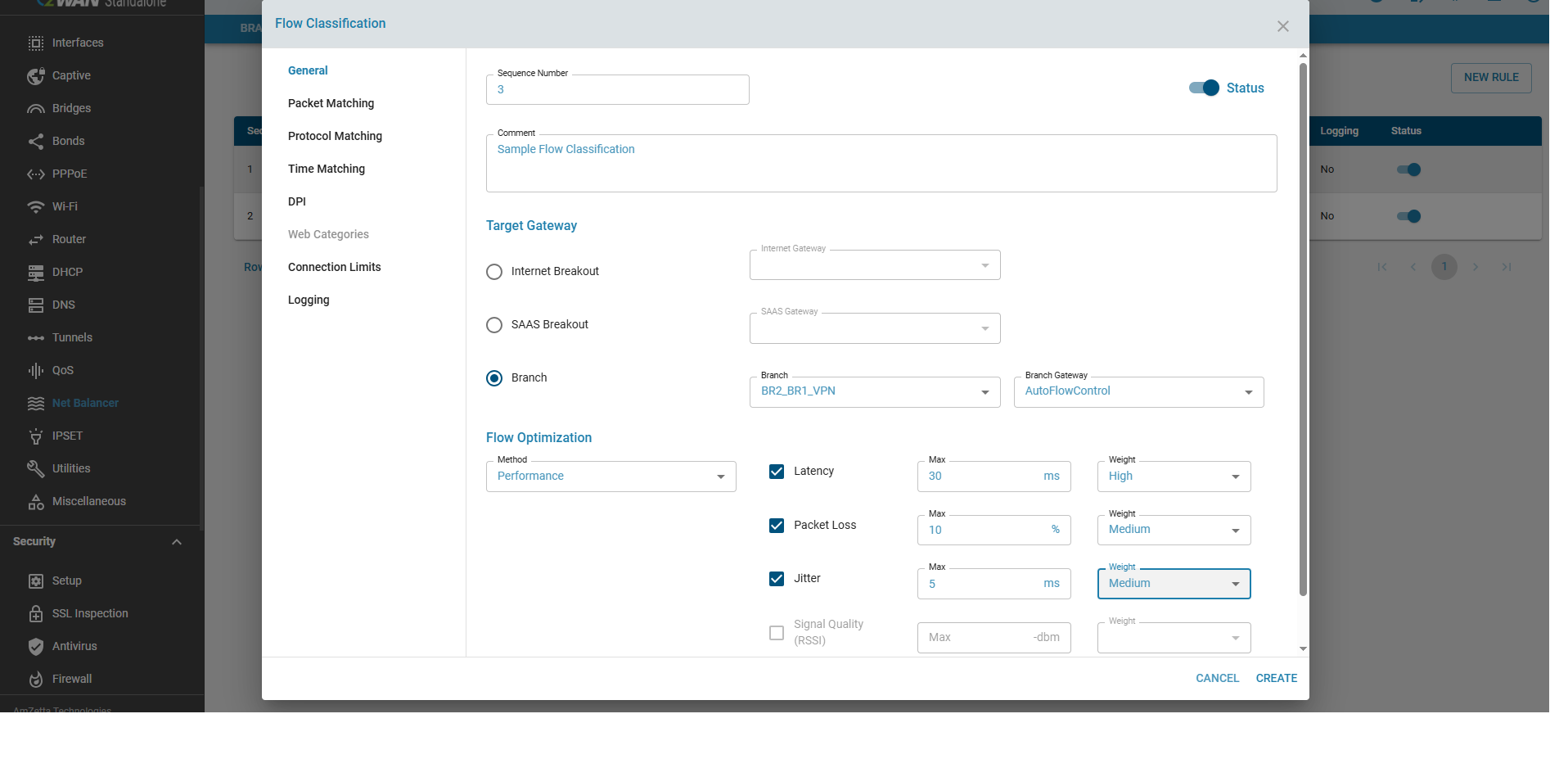
Notes:
- Can Enable/Disable a rule/filter
- Can Sequence the order or rule/filter
- Lower Sequence is exercised first.
Expected behavior in the system:
Once a rule is successfully created (and enabled), the rule will be immediately applied on the network packets. Depends on where it is used, it will take the appropriate action.
Known Limitation
- Currently only 999 rules can be added to a Chain