
-
SnapOS
-
-
- Articles coming soon
-
-
-
- Citrix HDX + USB Headset (Call-Center Baseline)
- OS/Firmware Update & Rollback
- Power Management and Session State
- Wi-Fi Roaming & Link Change Mid-Session
- Kiosk / Assigned-Access Auto-Launch
- Barcode Scanner (HID) with Line-of-Business App
- Printing to Local USB & Network Printers
- USB Device Management – Block Storage
- Multi-Monitor & 4K Performance
- Microsoft AVD/RDP + Teams Optimized Video
- VMware Horizon + Smart Card / CAC Login
-
-
-
-
zWAN
-
-
-
-
- Firewall & Layer 7 Application Filtering
- VPN Site-to-Site Tunnel Setup & Connectivity (z40 to Cloud vGR)
- Intrusion Prevention System (IPS) / Intrusion Detection System (IDS) Testing
- DNS Filtering
- DDoS Protection & Logging
- MAC Address Filtering & Geo-fencing
- Application Control & Protocol Blocking
- Authentication & Access Control (zID)
-
- WAN Link Failover & Load Balancing (ACI Mode)
- Dynamic Path Selection & Application-Aware Routing
- SaaS & Internet Breakout Validation
- QoS for Microsoft Teams (Datacenter vGR + Branch z40)
- Tunnel Failover (z40 ↔ vGR) — WAN00 (wired) primary, WAN03 (4G) & WAN04 (5G) backups
- IP Routing & Static Route Steering (z40 Branch)
- VLAN & Layer-2 Bridging
-
-
-
-
-
-
- Articles coming soon
-
-
-
-
- Articles coming soon
-
- Articles coming soon
-
-
-
-
-
-
- Articles coming soon
-
- Articles coming soon
-
- Articles coming soon
-
- Articles coming soon
-
-
-
-
-
- Articles coming soon
-
- Articles coming soon
-
- Articles coming soon
-
- Articles coming soon
-
-
-
-
-
- Articles coming soon
-
- Articles coming soon
-
- Articles coming soon
-
- Articles coming soon
-
-
- Articles coming soon
-
- IPsec Tunnel not Establishing
- SSL-VPN Tunnel not Establishing
- Mobile Network Issues
- Management Tunnel does not Establish
- DNS not Resolving from Local Network Appliance
- DNS Resolution Issues in Tunnel Configuration
- DHCP Server not Leasing IP to LAN PC
- Debugging EC Events - Unknown Status Issue
- Trusted-MAC Geofencing Issues
- DNS Issues from DC LAN PC
- Troubleshooting LAN Connectivity to Internet via WAN, Remote Branch LAN, or Local Branch LAN
- NetBalancer gateways displaying Faulty/Inactive
- Packet Drop Issues
-
-
zAccess
-
StorTrends
Gateway Devices
Quick Overview
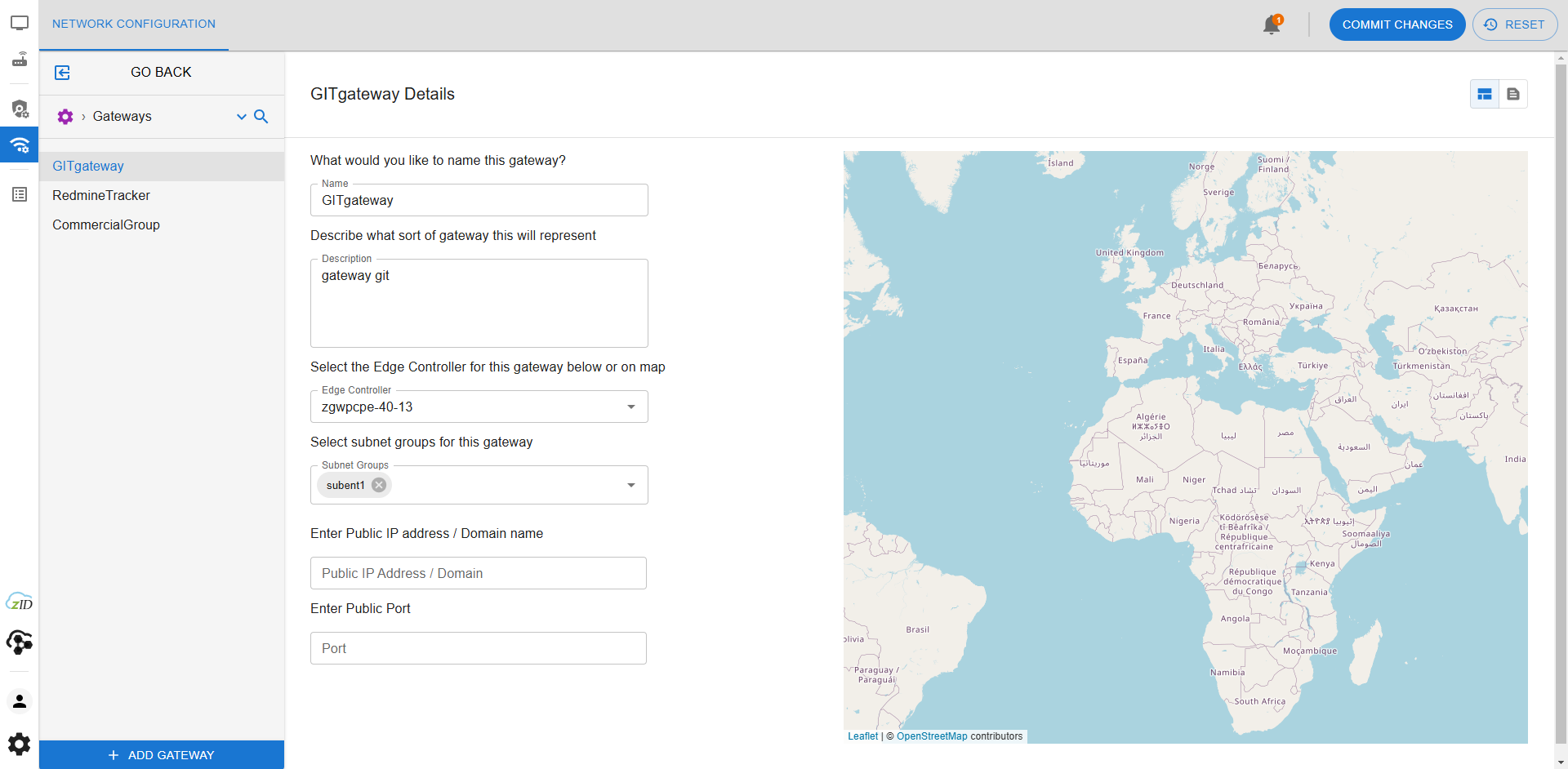
The Gateway Devices page displays all configured gateway endpoints that are active within the zAccess environment. Gateways act as the enforcement points for access policies and are essential for routing application traffic securely from endpoints. This view allows administrators to confirm device availability, track gateway assignments, and validate deployment status.
The Edge Controller should be upgraded as a gateway in this page inorder to use zAccess and allow users to select which applications are accessible through each one. It can also be left as empty if the gatewa is used in connector.
If the gateway is connected to a public IP address, the corresponding public IP and port information are provided as required input.
Click ADD GATEWAY
How to Use This Feature in the UI
- Login to your tenant using the Director interface.
- Ensure router/CPE devices are onboarded and appear online.
- From the right pane, select zAccess in the grid layout.
- Navigate to Gateway Devices from the left-hand navigation panel.
- The Gateway Devices page will display a list of all currently assigned gateways, including metadata such as status, IP address, name, and usage context.
- You can verify which policies and subnet groups are associated with each gateway device.
Concepts & Use Cases
- Policy Enforcement: Gateways ensure that only endpoints matching configured rulesets and policies can access specific applications.
- Device Visibility: Gateway Devices page gives administrators a central view of all enforcement nodes within their network.
- Multi-Site Deployment: In multi-location environments, each site may have a distinct gateway device managing application access for local endpoints.
- Redundancy and Load Balancing: Configuring multiple gateway devices ensures resilience and optimized traffic routing.
Troubleshooting & FAQs
- Why is a gateway device not showing as online?
Ensure that the device has been onboarded correctly and is powered on. Check for network connectivity issues between the device and zAccess Director. - Can I assign a gateway to more than one subnet?
Yes, gateway devices can be part of multiple subnet groups, which allows for flexible routing policies. - What happens if a gateway device goes offline?
The associated policies will no longer be enforced through that gateway, and access attempts may fail or fallback depending on configuration. - Do I need a gateway device for every endpoint?
No. Multiple endpoints can share a single gateway device as long as they are part of the associated subnet and policy groups.