
-
SnapOS
-
-
- Articles coming soon
-
-
-
- Citrix HDX + USB Headset (Call-Center Baseline)
- OS/Firmware Update & Rollback
- Power Management and Session State
- Wi-Fi Roaming & Link Change Mid-Session
- Kiosk / Assigned-Access Auto-Launch
- Barcode Scanner (HID) with Line-of-Business App
- Printing to Local USB & Network Printers
- USB Device Management – Block Storage
- Multi-Monitor & 4K Performance
- Microsoft AVD/RDP + Teams Optimized Video
- VMware Horizon + Smart Card / CAC Login
-
-
-
-
zWAN
-
-
-
-
- Firewall & Layer 7 Application Filtering
- VPN Site-to-Site Tunnel Setup & Connectivity (z40 to Cloud vGR)
- Intrusion Prevention System (IPS) / Intrusion Detection System (IDS) Testing
- DNS Filtering
- DDoS Protection & Logging
- MAC Address Filtering & Geo-fencing
- Application Control & Protocol Blocking
- Authentication & Access Control (zID)
-
- WAN Link Failover & Load Balancing (ACI Mode)
- Dynamic Path Selection & Application-Aware Routing
- SaaS & Internet Breakout Validation
- QoS for Microsoft Teams (Datacenter vGR + Branch z40)
- Tunnel Failover (z40 ↔ vGR) — WAN00 (wired) primary, WAN03 (4G) & WAN04 (5G) backups
- IP Routing & Static Route Steering (z40 Branch)
- VLAN & Layer-2 Bridging
-
-
-
-
-
-
- Articles coming soon
-
-
-
-
- Articles coming soon
-
- Articles coming soon
-
-
-
-
-
-
- Articles coming soon
-
- Articles coming soon
-
- Articles coming soon
-
- Articles coming soon
-
-
-
-
-
- Articles coming soon
-
- Articles coming soon
-
- Articles coming soon
-
- Articles coming soon
-
-
-
-
-
- Articles coming soon
-
- Articles coming soon
-
- Articles coming soon
-
- Articles coming soon
-
-
- Articles coming soon
-
- IPsec Tunnel not Establishing
- SSL-VPN Tunnel not Establishing
- Mobile Network Issues
- Management Tunnel does not Establish
- DNS not Resolving from Local Network Appliance
- DNS Resolution Issues in Tunnel Configuration
- DHCP Server not Leasing IP to LAN PC
- Debugging EC Events - Unknown Status Issue
- Trusted-MAC Geofencing Issues
- DNS Issues from DC LAN PC
- Troubleshooting LAN Connectivity to Internet via WAN, Remote Branch LAN, or Local Branch LAN
- NetBalancer gateways displaying Faulty/Inactive
- Packet Drop Issues
-
-
zAccess
-
StorTrends
Print
DHCP IPV6
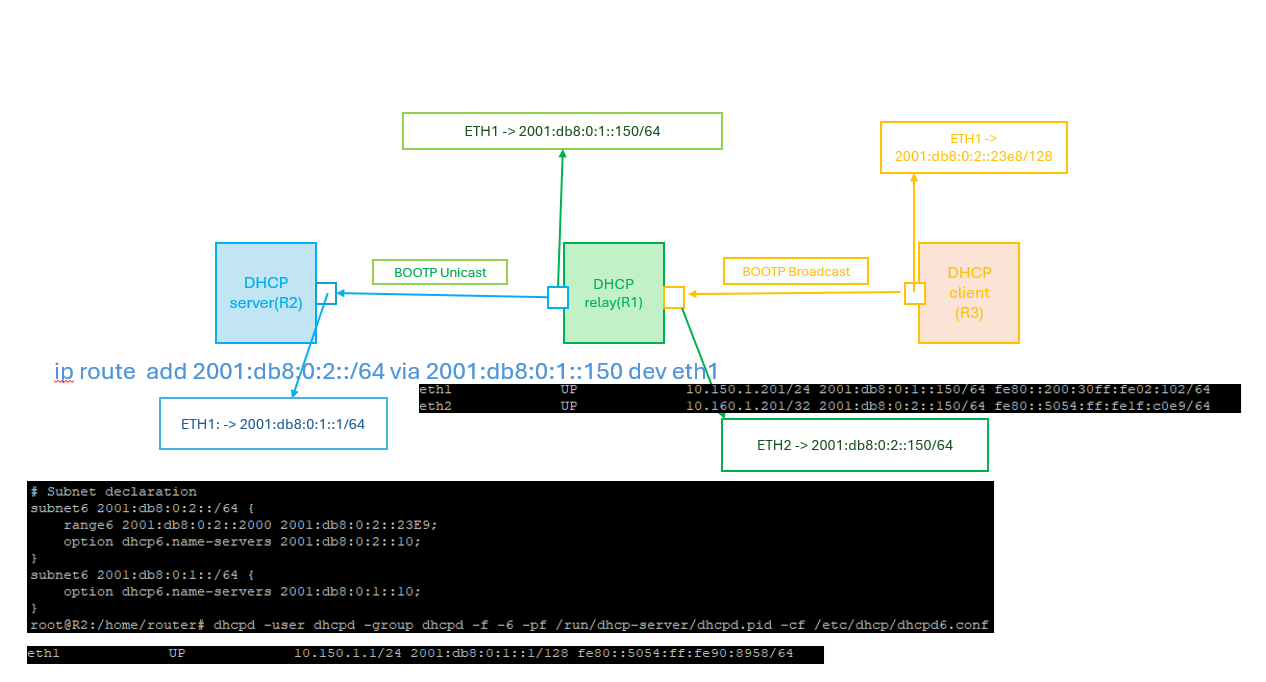
DHCP relay agent provides a method of relaying/forwarding DHCP and BOOTP requests from a DHCP client and DHCP server on different IP networks. It acts as an interface between DHCP client and the server. The DHCP Relay Agent listens for DHCPv4 or DHCPv6 queries from clients or other relay agents on one or more interfaces, passing them along to upstream servers . When a reply is received from upstream, it is multicast or unicast back downstream to the source of the original request. This page explains about configuring DHCP Relay in zWAN CPE for IPV6.
A sample DHCP Relay network topology is depicted below.
Pre-requisite:
- DHCP server config should be disabled/deleted on interfaces which is to be added part of DHCP relay configuration.
Functionality
The zWAN CPE can be configured for DHCP IPv6 relay by adding the DHCP server IP and the relay interfaces in the zWAN CPE.
Parameters
- Configuration Name: Configuration Name for reference
- Config Status : Configuration Status to enable the particular relay server config
- Port : Listen and transmit on configured port. Default is 547
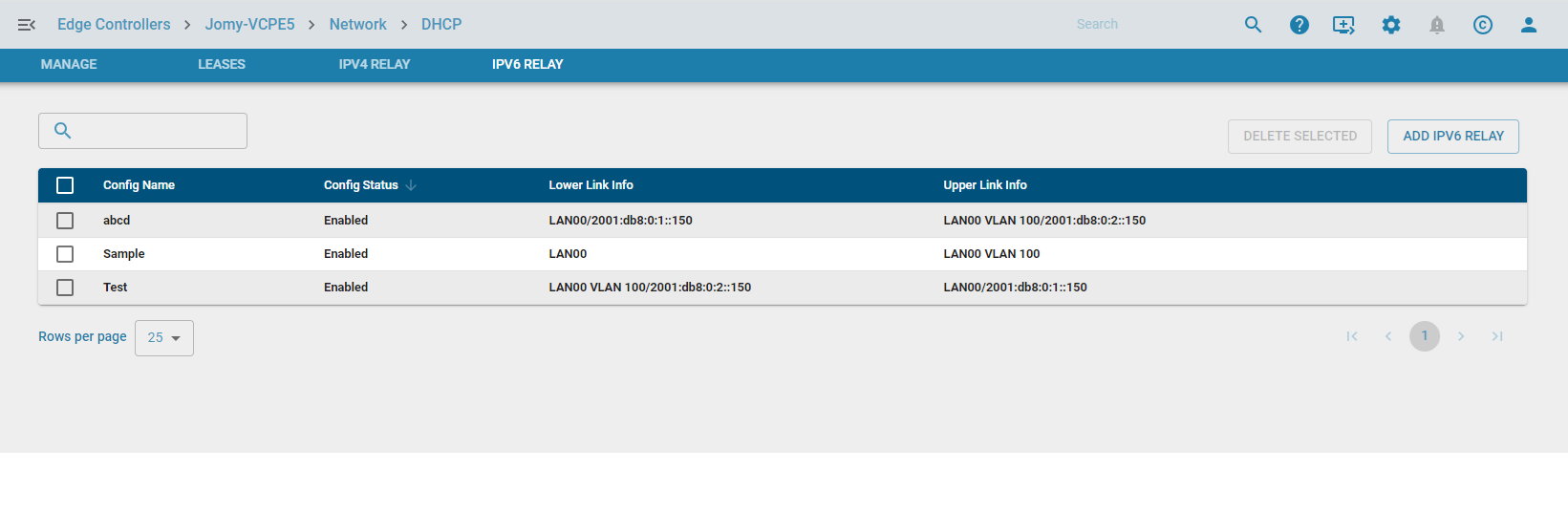
- LowerLink : Specify the lower network interface/link info on which requests will be received from clients or from other relay agents. If V6 IP is not provided, the first non-link local IP of the interface will be taken.
- UpperLink : Specify the upper network interface/link for DHCPv6 interface to which requests from clients and other relay agents should be forwarded. If address is not specified, the requests will be forwarded to the FF02::1:2
multicast address (All_DHCP_Relay_Agents_and_Servers). - Add Interface ID : Interface ID to force the use of the DHCPv6 Interface-ID option. This option is automatically sent when there are two or more downstream interfaces in use, in order to disambiguate between them.
- Hop Count: When forwarding packets, dhcrelay agent will discard packets which have reached the configured hop count. Default is 10. Maximum is 255
Functionalities in UI:
- Add V6 Relay configuration

- Edit V6 Relay configuration

- Delete V6 Relay configuration
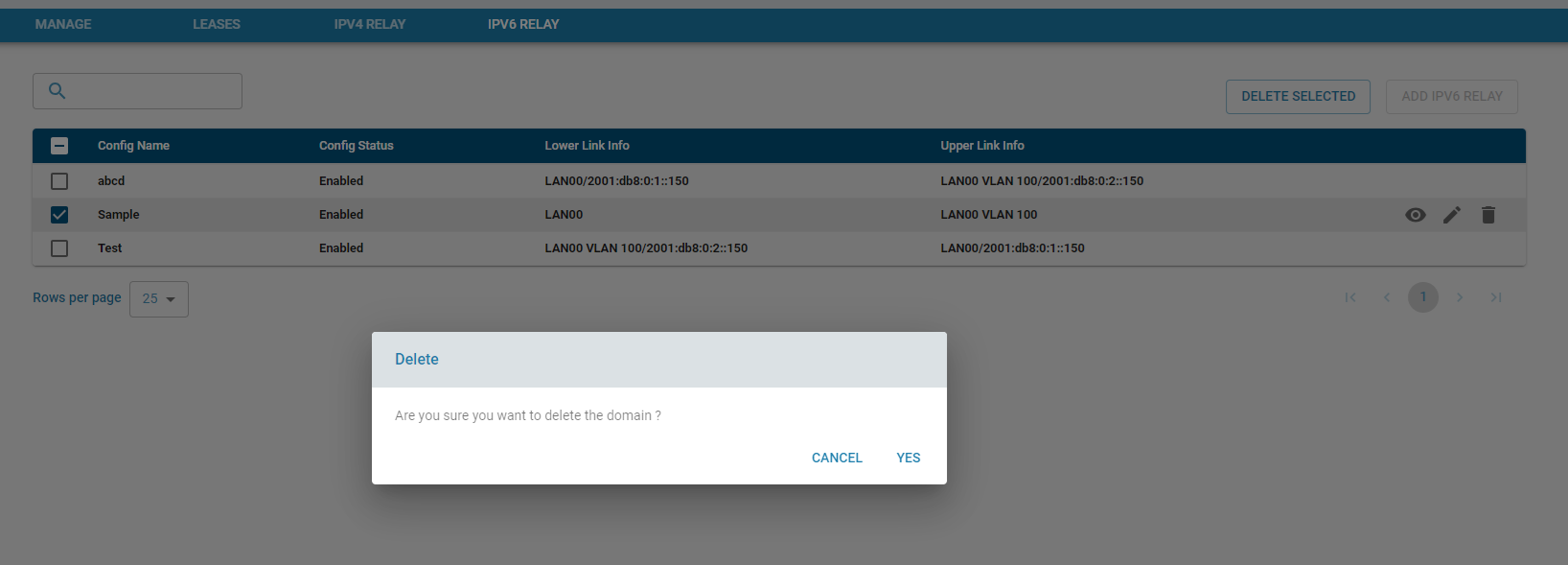
- List V6 Relay configuration
- Display Config Info
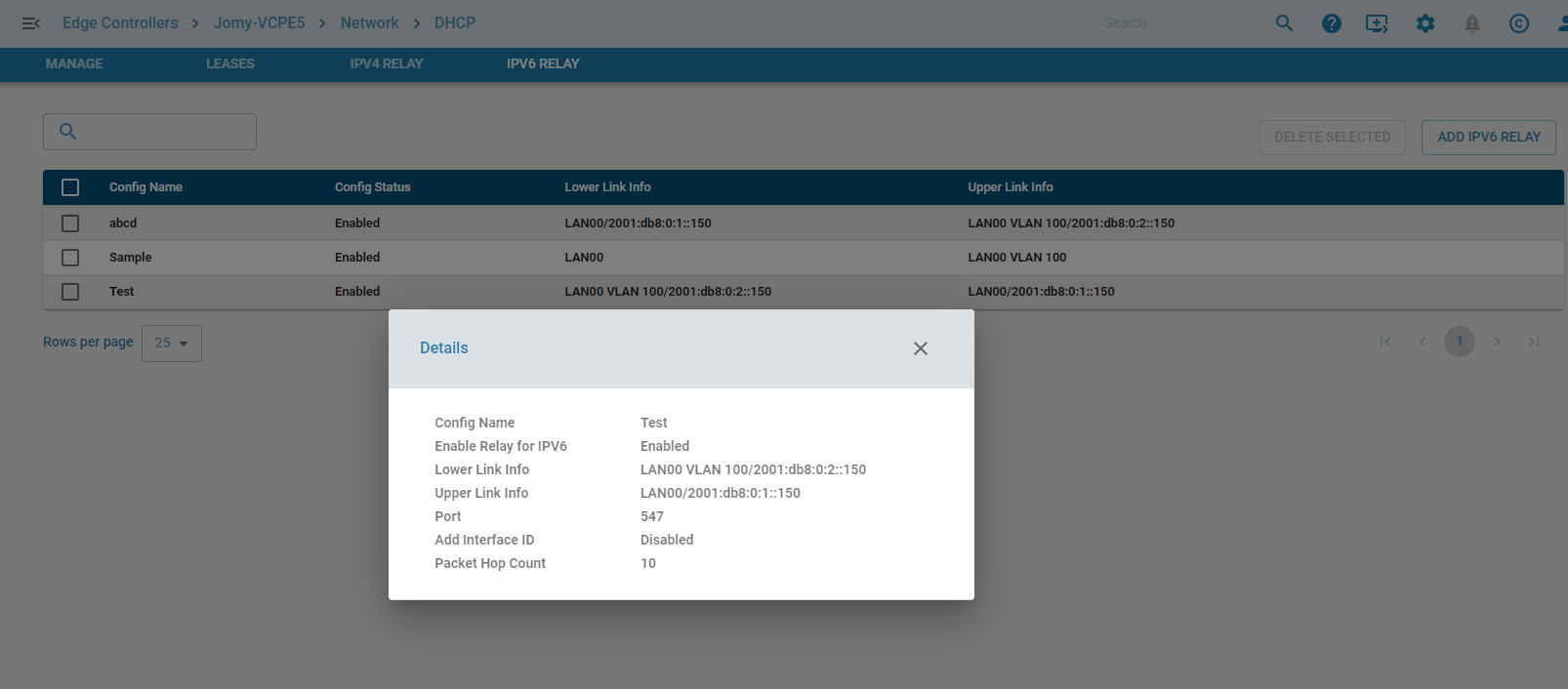
Table of Contents