
-
SnapOS
-
-
- Articles coming soon
-
-
-
- Citrix HDX + USB Headset (Call-Center Baseline)
- OS/Firmware Update & Rollback
- Power Management and Session State
- Wi-Fi Roaming & Link Change Mid-Session
- Kiosk / Assigned-Access Auto-Launch
- Barcode Scanner (HID) with Line-of-Business App
- Printing to Local USB & Network Printers
- USB Device Management – Block Storage
- Multi-Monitor & 4K Performance
- Microsoft AVD/RDP + Teams Optimized Video
- VMware Horizon + Smart Card / CAC Login
-
-
-
-
zWAN
-
-
-
-
- Firewall & Layer 7 Application Filtering
- VPN Site-to-Site Tunnel Setup & Connectivity (z40 to Cloud vGR)
- Intrusion Prevention System (IPS) / Intrusion Detection System (IDS) Testing
- DNS Filtering
- DDoS Protection & Logging
- MAC Address Filtering & Geo-fencing
- Application Control & Protocol Blocking
- Authentication & Access Control (zID)
-
- WAN Link Failover & Load Balancing (ACI Mode)
- Dynamic Path Selection & Application-Aware Routing
- SaaS & Internet Breakout Validation
- QoS for Microsoft Teams (Datacenter vGR + Branch z40)
- Tunnel Failover (z40 ↔ vGR) — WAN00 (wired) primary, WAN03 (4G) & WAN04 (5G) backups
- IP Routing & Static Route Steering (z40 Branch)
- VLAN & Layer-2 Bridging
-
-
-
-
-
-
- Articles coming soon
-
-
-
-
- Articles coming soon
-
- Articles coming soon
-
-
-
-
-
-
- Articles coming soon
-
- Articles coming soon
-
- Articles coming soon
-
- Articles coming soon
-
-
-
-
-
- Articles coming soon
-
- Articles coming soon
-
- Articles coming soon
-
- Articles coming soon
-
-
-
-
-
- Articles coming soon
-
- Articles coming soon
-
- Articles coming soon
-
- Articles coming soon
-
-
- Articles coming soon
-
- IPsec Tunnel not Establishing
- SSL-VPN Tunnel not Establishing
- Mobile Network Issues
- Management Tunnel does not Establish
- DNS not Resolving from Local Network Appliance
- DNS Resolution Issues in Tunnel Configuration
- DHCP Server not Leasing IP to LAN PC
- Debugging EC Events - Unknown Status Issue
- Trusted-MAC Geofencing Issues
- DNS Issues from DC LAN PC
- Troubleshooting LAN Connectivity to Internet via WAN, Remote Branch LAN, or Local Branch LAN
- NetBalancer gateways displaying Faulty/Inactive
- Packet Drop Issues
-
-
zAccess
-
StorTrends
Site to Mobile VPN Configuration
Configuration Parameters:
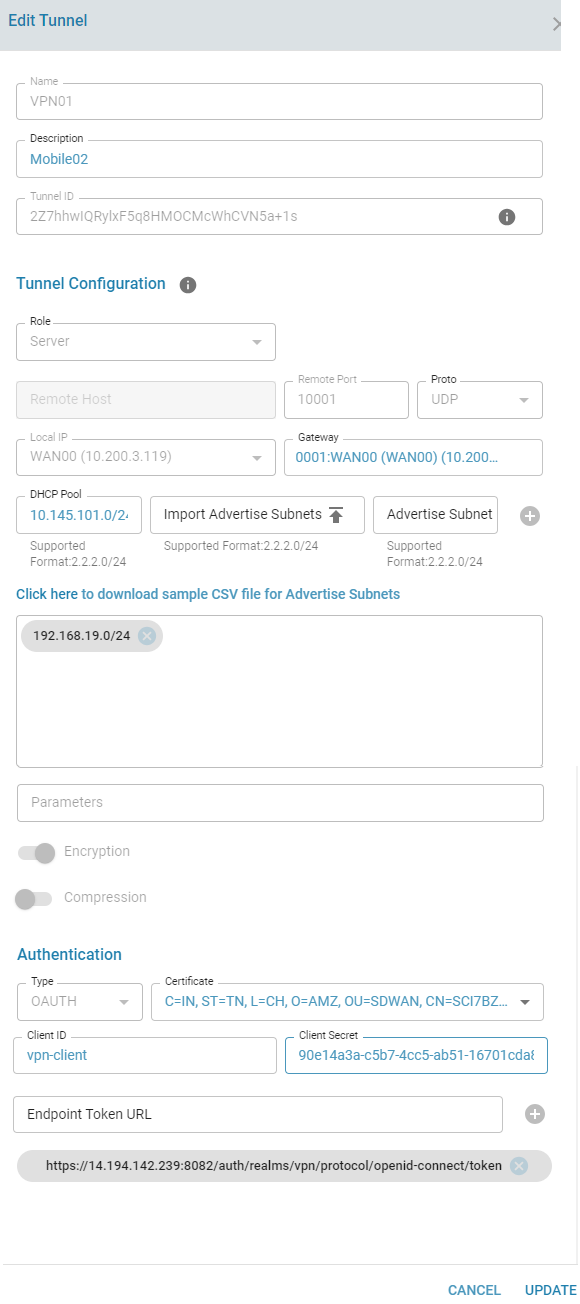
- Can be configured only in a Server role. Please select the local IP address and local port;
- The port must be unique and should not be conflict with other VPN tunnel configuration in the same edge controller.
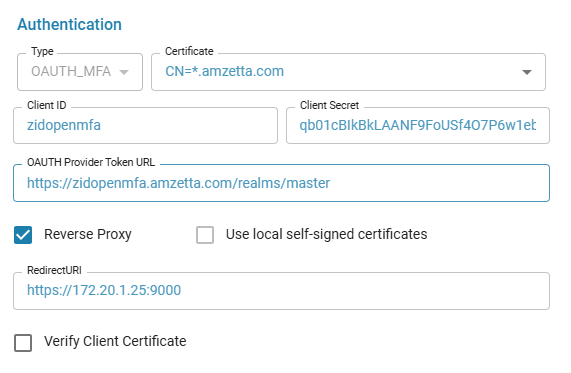
- Peer mutual authentication will be based on either X.509 Certificate or LDAP or OAUTH or OAUTH_MFA
- Only UDP protocol is supported in this mode
- When X509 authentication is choosen, peer connection can be filtered based on Certificate Common Name (Remote-CN)
- OAUTH configuration is added at a Director level for each user. The Client ID and Client Secret needs to be provided. Multiple endpoint url tokens can be provided.
- When using LDAP, provide the LDAP URL and appropriate values in the fields specified
Create Tunnel
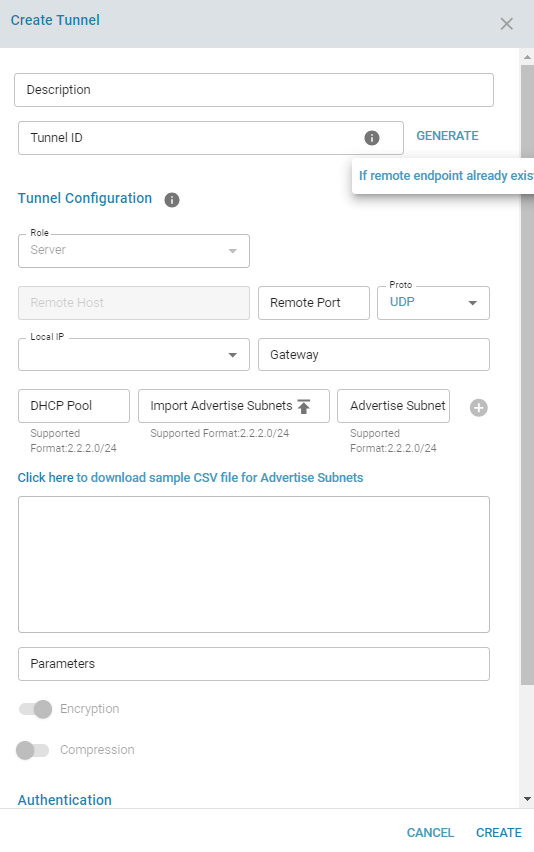
Authentication Types
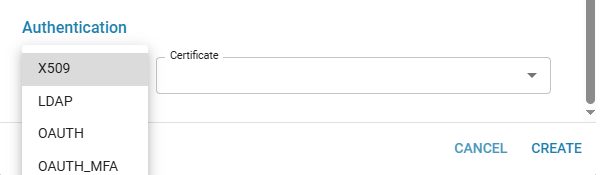
- LDAP
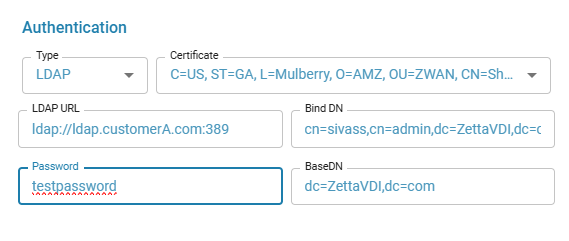
- OAUTH
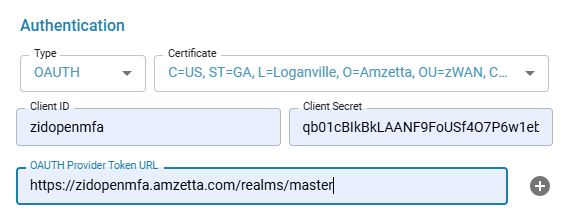
- OAUTH_MFA
The Remote Endpoint URL or OAUTH Provider Token URL is the address of your Identity Provider or the Reverse Proxy that handles the secure (TLS) connection. The Redirect URI is the URL of that same Reverse Proxy, or alternatively, the EC default OpenVPN Auth port (http://
The CA certificate used by the reverse proxy should be imported on the EC to validate the issuer of the certificate.
Using self-signed certificates can generate security warnings on the Client's browser pages.
A sample NGINX Reverse Proxy configuration for a locally hosted Identity Provider and the OpenVPN OAUTH server hosted on the EC
Locally Hosted Identity Provider
server {
  listen 443 ssl;
  listen [::]:443 ssl;

  ssl_certificate <Customer Host certificate>;
  ssl_certificate_key <Customer Host private key>;

  ssl_session_cache shared:le_nginx_SSL:10m;
  ssl_session_timeout 1440m;
  ssl_session_tickets off;

  ssl_protocols TLSv1.2 TLSv1.3;
  ssl_prefer_server_ciphers off;

  ssl_ciphers "ECDHE-ECDSA-AES128-GCM-SHA256:ECDHE-RSA-AES128-GCM-SHA256:ECDHE-ECDSA-AES256-GCM-SHA384:ECDHE-RSA-AES256-GCM-SHA384:ECDHE-ECDSA-CHACHA20-POLY1305:ECDHE-RSA-CHACHA20-POLY1305:DHE-RSA-AES128-GCM-SHA256:DHE-RSA-AES256-GCM-SHA384";

  error_page 497 https://$host:$server_port$request_uri;

  location / {
    proxy_pass http://<IP address of locallty hosted IDP>:9080/;
    proxy_http_version 1.1;
    proxy_set_header Upgrade $http_upgrade;
    proxy_set_header Connection "upgrade";
    proxy_set_header Host $http_host;
    proxy_set_header X-Forwarded-For $proxy_add_x_forwarded_for;
    proxy_set_header X-Real-IP $remote_addr;
    proxy_set_header X-Forwarded-Host $host;
    proxy_set_header X-Forwarded-Server $host;
    proxy_set_header X-Forwarded-Port $server_port;
    proxy_set_header X-Forwarded-Proto $scheme;

    proxy_buffer_size          128k;
    proxy_buffers              4 256k;
    proxy_busy_buffers_size    256k;
  }
}
OpenVPN OAUTH Server
server {
  listen <TLS termination port to listed on the Reverse proxy server> ssl;
  listen [::]:<TLS termination port to listed on the Reverse proxy server> ssl;

  ssl_certificate <Customer Host certificate>;
  ssl_certificate_key <Customer Host private key>;

  ssl_session_cache shared:le_nginx_SSL:10m;
  ssl_session_timeout 1440m;
  ssl_session_tickets off;

  ssl_protocols TLSv1.2 TLSv1.3;
  ssl_prefer_server_ciphers off;

  ssl_ciphers "ECDHE-ECDSA-AES128-GCM-SHA256:ECDHE-RSA-AES128-GCM-SHA256:ECDHE-ECDSA-AES256-GCM-SHA384:ECDHE-RSA-AES256-GCM-SHA384:ECDHE-ECDSA-CHACHA20-POLY1305:ECDHE-RSA-CHACHA20-POLY1305:DHE-RSA-AES128-GCM-SHA256:DHE-RSA-AES256-GCM-SHA384";

  location / {
    proxy_pass http://<IP of the Edge controller>:9000/;

    proxy_set_header Host $host;
    proxy_set_header X-Real-IP $remote_addr;
    proxy_set_header X-Forwarded-For $proxy_add_x_forwarded_for;
    proxy_set_header X-Forwarded-Proto $scheme;
    proxy_set_header X-Forwarded-Host $host; # Crucial for some apps
    proxy_set_header X-Forwarded-Port $server_port; # Crucial for some apps

    proxy_http_version 1.1;
    proxy_set_header Upgrade $http_upgrade;
    proxy_set_header Connection "upgrade";

    proxy_buffer_size          128k;
    proxy_buffers              4 256k;
    proxy_busy_buffers_size    256k;
  }
}
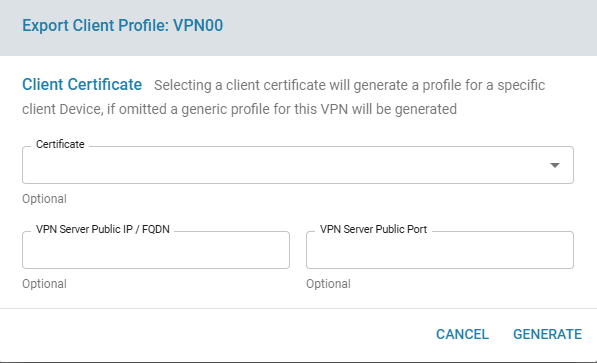
Export Client Profile .OVPN File
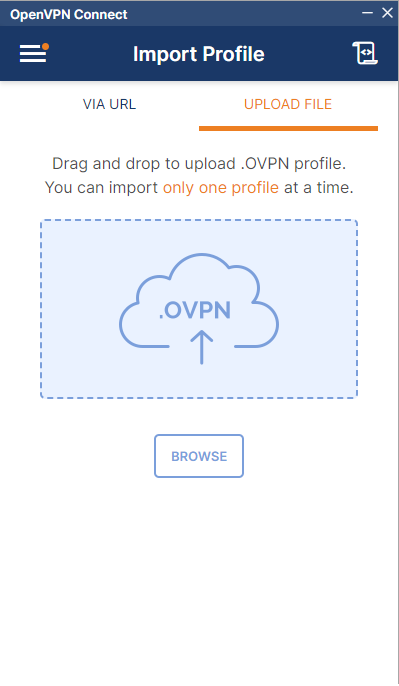
The .ovpn file can then be imported into the OpenVPN Connect. Click on "Export Client Profile" in the options

Selecting a certificate selection is not mandatory and is used for additional protection if need be.
The downloaded .ovpn file can be uploaded to the OpenVPN Connect Application
Edit Tunnel
Connected Users
The connected users can be viewed by clicking the Connected clients icon respective to each tunnel
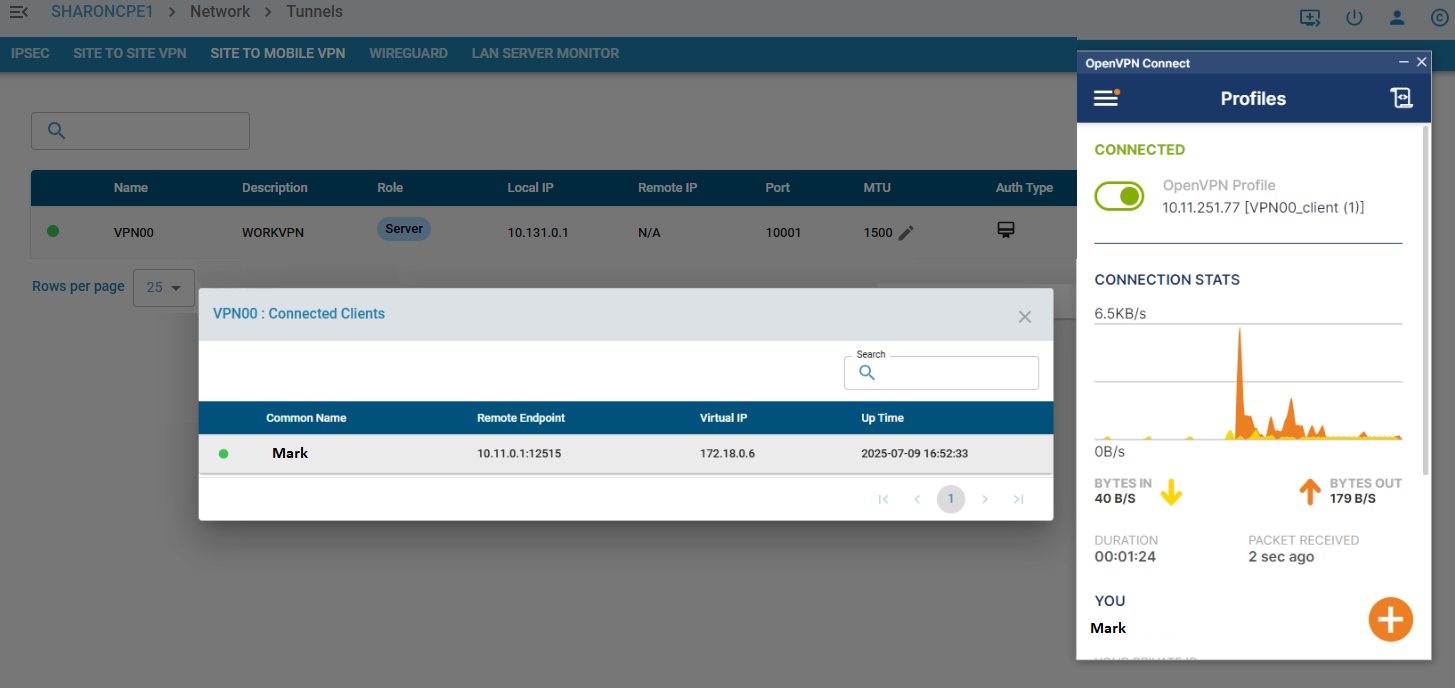
Tunnel Info:
Here,
- VPN tunnel can be enabled/disabled
- VPN tunnel can be deleted
- ADD IP or VLAN to the tunnel interface for Site-To-Site Tunnels
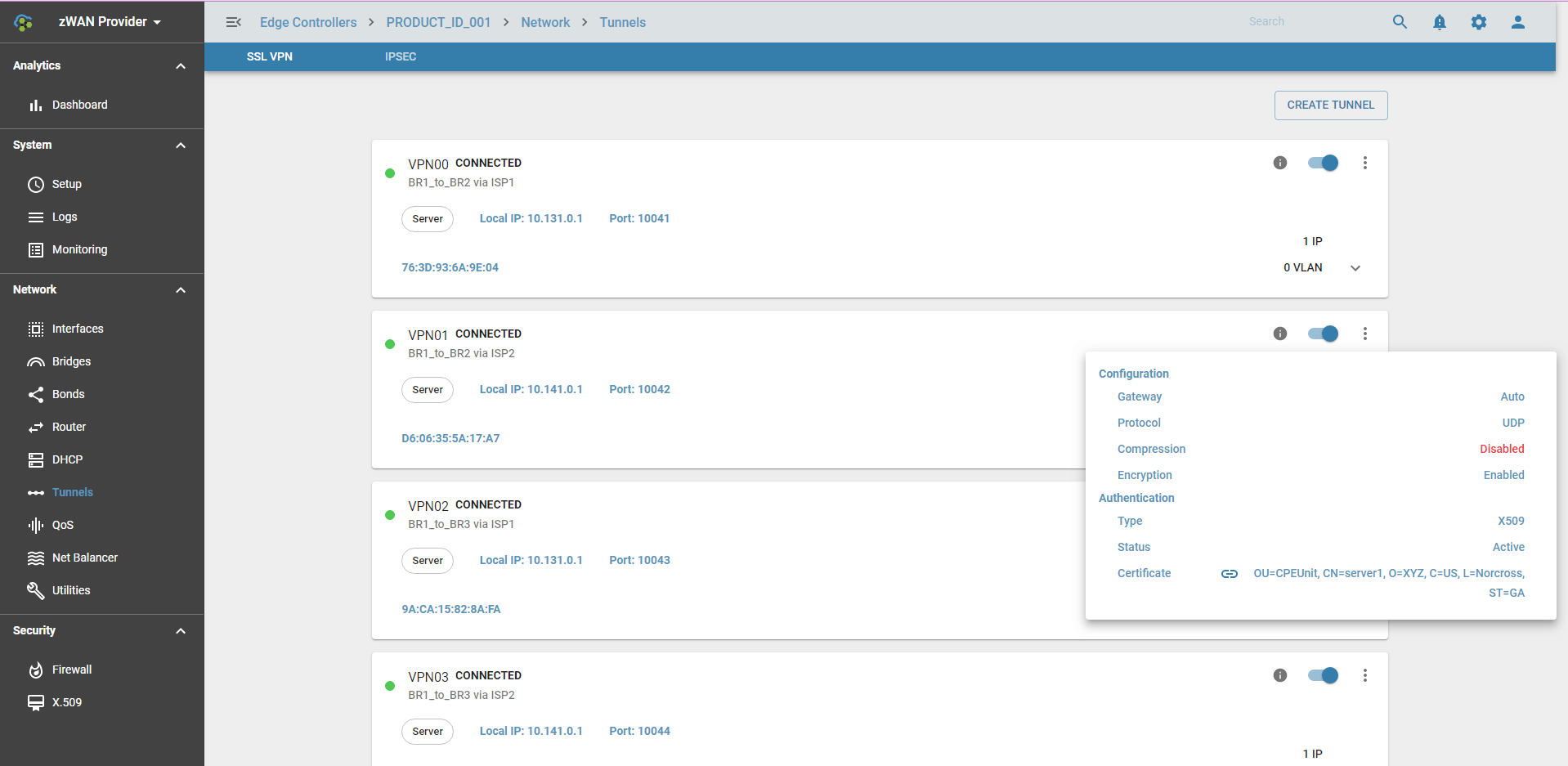
Expected behaviour in the system:
Once VPN tunnel is successfully created, it will create VPN tap or tun interface, example VPN00.
- The VPN tap interface can be used for Bond, Bridge or can assign IP. VLAN can be created on top of VPN Tunnel interface.
- The VPN tun interface the base IP of the DHCP subnet is automatically assigned and it will act as the DHCP server for all Mobile clients
VPN tunnel interface status
VPN interface has the follownig states:
- WAIT -- Waiting for initial response from server/client.
- AUTH -- Authenticating with server.
- CONNECTED -- Initialization Sequence Completed.
- RECONNECTING -- A restart has occurred.
- CONNECTING -- OpenVPN's initial state.
- EXITING -- A graceful exit is in progress.
- DOWN -- SSL VPN is disabled
SSLVPN Color Status in UI:
- GREEN: WAIT, AUTH, CONNECTED, RECONNECTING
- RED: CONNECTING, EXITING
- GRAY: DOWN
CrossLink Failover for SSL VPN tunnels
When SSLVPN Site-To-Site tunnels in Client Mode are assigned affinity to a NetBalancer gateway, cross link failover functionality is enabled by default. When the interface that the SSL VPN tunnel is running on fails or the Net Balancer gateway fails, the SSL VPN tunnel is restarted on another active gateway tunnel belonging to the same Net Balancer branch.
Tunnel Usage
In SDWAN, tunnels are used in Load Balancer. It can work without Load Balancer too. Load Balancer groups multiple VPNs that connects to the same branch. On top of the tunnel functionality its adds Load Balancing and Link fault tolerance to the Branch to Branch connections.
Known Limitation
- Currently only 99 SSL VPN tunnel can be created per ZWAN controller.
[/vc_column_text][/vc_column][/vc_row]